

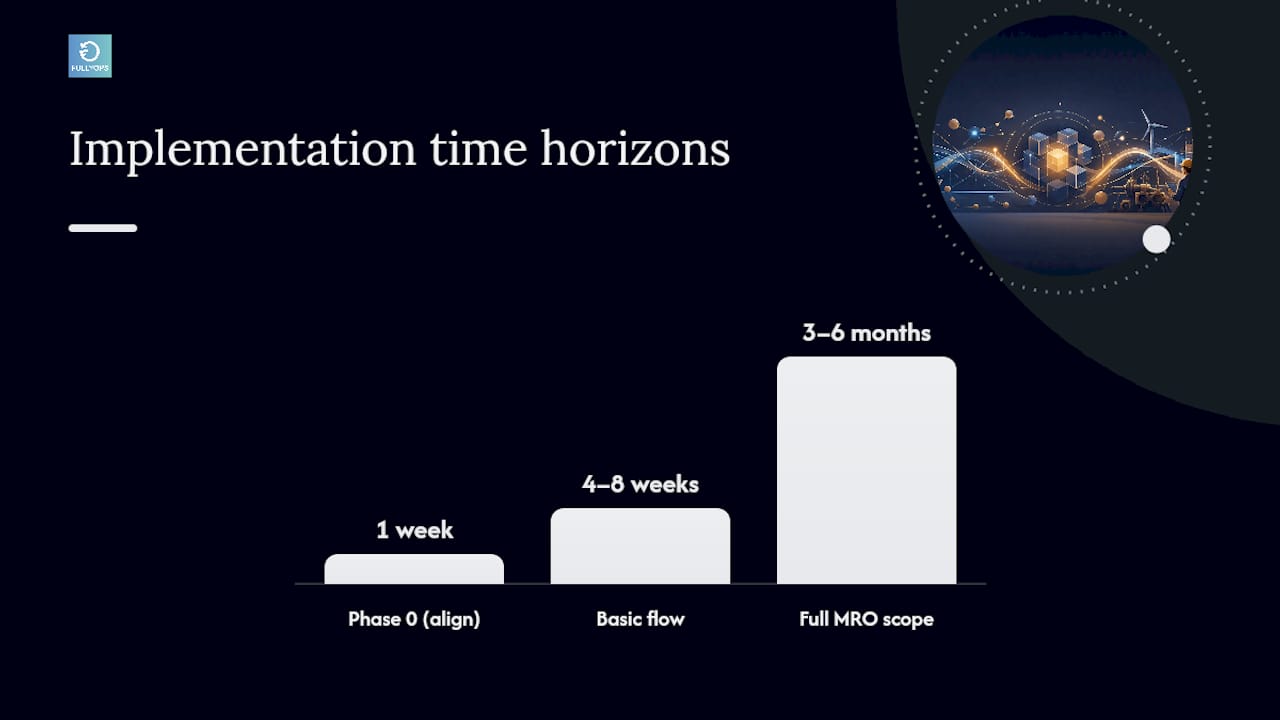
The most reliable approach to CMMS ERP integration is selective, not total: the ERP owns asset registries, cost centres, and financial masters, while the CMMS owns work orders, technician notes, and intervention history. Automate only the handful of bidirectional flows that actually remove manual re-keying, such as parts consumption feeding ERP inventory and closed work orders posting costs automatically. A basic work-order-to-cost-posting integration typically takes four to eight weeks, while full MRO synchronisation runs three to six months.
Resumo:
- Automate only the most critical bidirectional flows, such as parts consumption and work order cost posting, to reduce complexity and implementation time.
- Prioritize synchronization of inventory levels, purchase orders, and intervention costs to improve stock accuracy and enable faster month-end closing.
- Ensure master data consistency by choosing one system as the asset master and reconciling asset IDs before building integration scripts.
- Select integration mechanisms based on transaction type, with batch methods for historical data and real-time APIs for critical transactions like cost posting in SAP environments.
- Focus on phased implementation, starting with a pilot scope such as one plant or asset class, and build rollback procedures to mitigate risks during rollout.
Índice
- What benefits does CMMS ERP integration actually deliver?
- What mistakes commonly break traceability during integration?
- Which data should sync between CMMS and ERP?
- How do you choose the right integration mechanism?
- What does a realistic implementation roadmap look like?
- How does Fullyops support this integration approach?
- What should you do this week?
- Why most CMMS ERP integration advice misses the point
- Get integration support built for maintenance teams
- Sources
- FAQ
What benefits does CMMS ERP integration actually deliver?
Integration pays off in specific, countable ways rather than vague efficiency gains. When a technician closes a work order in the CMMS and that cost lands in the ERP’s general ledger without anyone touching a spreadsheet, finance closes the month faster and maintenance stops chasing missing numbers.
The financial case rests on inventory accuracy above almost everything else. Poor visibility into stock levels is one of the biggest drivers of waste across supply chains, and Bloomberg’s supply-chain reporting puts inventory waste in the hundreds of billions annually across industries. A synchronised parts-consumption flow between CMMS and ERP directly narrows that gap by keeping stock counts honest in near real time.
Here’s what shows up on a scorecard once the integration is live:
- Less manual re-entry: technicians log parts and hours once, in the CMMS, and the ERP receives the transaction automatically.
- Faster month-end close: maintenance costs post as work orders close, rather than arriving as a batch reconciliation exercise days later.
- Fewer stockouts and less ghost stock: real-time inventory updates mean procurement reorders against actual consumption, not stale counts.
- Better traceability for audits: every intervention links to downtime and cost, which matters when a compliance officer or auditor asks “why did this asset fail three times this quarter?”
- Shared visibility across teams: procurement, maintenance, and finance work from the same event stream instead of three separate spreadsheets that never quite agree.
Dica profissional: Track reconciliation hours before and after integration. It’s the single clearest number to show a CFO that the project paid for itself.
None of this requires syncing every field between the two systems. A facility that automates just parts consumption and work-order cost posting typically captures most of the traceability benefit for a fraction of the integration effort a full sync demands. The spare parts management practices that already work well inside a CMMS become far more valuable once inventory movements flow into the ERP without a human retyping them.
What mistakes commonly break traceability during integration?
Most integration failures aren’t technical. They’re scoping decisions made in week one that nobody revisits until an audit exposes them.
- Treating the ERP as a de facto CMMS. Some teams try to log technician notes, checklists, or intervention detail directly in the ERP because “it’s already there.” This strips out the technical context a CMMS is built to hold, and audits become harder, not easier, because the story of what happened to an asset gets flattened into a generic cost line.
- Running duplicated asset or location masters. When both systems maintain their own asset IDs with no reconciliation, cross-referencing a failure history against a cost centre becomes guesswork. Pick one system as the master for asset identity and enforce it everywhere else.
- Bulk-syncing every field on day one. Teams that try to integrate everything at once tend to spend months in testing purgatory. Prioritise the two or three flows that remove the most manual work, prove those out, then expand.
- Building connectors that snap during upgrades. A custom integration hard-coded against a specific ERP version breaks the moment IT rolls out a patch. Standard, vendor-supported connectors survive upgrades; bespoke scripts usually don’t.
- Skipping rollback and reconciliation procedures. If a sync fails halfway through a batch, you need a documented way to identify which records went through and which didn’t, before the next cycle compounds the error.
Dica profissional: Before writing a single integration script, agree on which system “wins” when the same asset ID exists in both places with conflicting data. This single decision prevents more rework than any technical fix.
Which data should sync between CMMS and ERP?
The clearest way to scope an integration project is to decide, record type by record type, which system is the master and which direction data should flow.
The ERP holds the financial and structural truth:
- Asset registry (the canonical list of what exists and where)
- Cost centres and general ledger mappings
- Procurement records, purchase orders, and supplier data
The CMMS holds the operational and technical truth:
- Work orders and preventive maintenance schedules
- Intervention history and technician notes
- Compliance evidence, such as calibration or inspection records
Between these two, three flows are worth automating in almost every implementation. Parts consumed during an intervention should reduce ERP inventory automatically. Approved purchase orders and goods receipts should flow back into the CMMS so technicians see accurate stock without logging into a second system. And a closed work order should trigger a cost posting in the ERP, capturing labour and parts against the right cost centre without a finance clerk re-typing figures from a maintenance report.
Everything else, historical records, older asset data, long-tail reporting tables, can move as a one-way batch feed rather than a live bidirectional sync. There’s no operational reason to build real-time plumbing for data nobody touches after it’s archived. Understanding the role a CMMS plays in maintenance makes this division obvious: it’s the system of record for what happened on the shop floor, not for what the business owes a supplier.
How do you choose the right integration mechanism?
The technical mechanism you choose has to match the transaction type, not just the ERP brand. Get this wrong and you end up with a fragile integration that needs constant babysitting.
- IDoc: suited to batch or EDI-style transfers, such as nightly inventory reconciliation or historical reporting feeds, particularly in SAP environments.
- BAPI/RFC: built for synchronous transactions in SAP, the right choice when a cost posting or stock movement needs to happen in real time rather than overnight.
- OData/REST APIs: the standard route for cloud ERPs and modern CMMS platforms, and increasingly the default across Oracle’s integration layer and similar cloud-native systems.
- Power Platform connectors: relevant for Microsoft Dynamics environments where a low-code approach suits smaller IT teams without dedicated integration developers.
Documentation from CMMS to ERP integration specialists confirms that SAP environments alone typically call for IDoc, BAPI/RFC, and OData depending on the transaction, which underlines why a single mechanism rarely covers an entire integration project. Synchronous transactions like cost postings often need something like BAPI/RFC precisely because the ERP needs to confirm the transaction succeeded before the CMMS marks the work order fully closed; batch or EDI-style flows tolerate the latency that IDoc introduces.
Before picking a mechanism, evaluate what your ERP vendor already supports. Gartner’s vendor reviews for EAM and CMMS platforms show integration maturity varies considerably between vendors, so a connector that’s well-documented and actively maintained by the vendor will almost always outperform something built in-house from scratch. Where a project needs to normalise data across more than two systems, an iPaaS or middleware layer is worth the extra cost, since it centralises the mapping logic instead of scattering point-to-point scripts that each need separate maintenance.
Whatever mechanism you choose, plan for ERP upgrade cycles from day one. A connector that isn’t built against a documented, versioned API tends to break silently the next time IT patches the ERP, and you won’t find out until a reconciliation report comes back wrong. Reviewing real integration examples on sites like Capterra before committing to a mechanism is a sensible sanity check against vendor marketing claims.
What does a realistic implementation roadmap look like?
Treat this as a phased project with hard gates, not a single big-bang cutover.
- Phase 0, alignment (week one). Get operations, procurement, finance, and IT in the same room to agree on outcomes and KPIs. If finance wants faster month-end close and maintenance wants fewer stockouts, both are valid, but they change which flows you prioritise first.
- Pick a pilot scope. One plant, one asset class, or one cost centre is enough. Implement work-order-to-cost-posting first, since it’s usually the flow with the clearest ROI and the least ambiguity around master data.
- Resolve master data before writing integration code. Build canonical asset IDs, mapping tables between CMMS and ERP identifiers, and reconciliation scripts that flag mismatches. Skipping this step is the single most common reason pilots stall.
- Test in layers. Functional testing confirms individual transactions post correctly; integration testing confirms the full round trip works under load; regression testing, run again after every ERP or CMMS upgrade, confirms nothing broke. Best-practice testing templates, such as those from Accelix’s implementation webinars, give a useful starting checklist for this stage.
- Roll out in stages, with rollback ready. Expand from the pilot plant to others only once reconciliation has run clean for at least one full billing cycle.
Dica profissional: Build your rollback script before go-live, not after something breaks. It should let you identify every record touched by the integration in the last 24 hours and revert it in one pass.
Budget four to eight weeks for a basic work-order-to-cost-posting flow, and three to six months if the scope extends to full MRO inventory sync and compliance linking. Piloting through a documented processo de gestão de ordens de trabalho before scaling gives you a template you can repeat across additional plants without re-solving the same master data problems each time.
How does Fullyops support this integration approach?
Fullyops is built around the workflows this roadmap depends on: work order management, inventory tracking, and reporting that link directly to intervention history. A typical engagement follows the same shape as the roadmap above, scoping the pilot, configuring the platform’s API mapping against the ERP’s asset and cost structures, then running the pilot before scaling to additional sites or asset classes.
The documented example of an ERP integration with field service management using SAGE shows the pattern in practice: CMMS handles technician workflows while approved transactions post automatically to the financial system. Operations managers running this kind of integration typically see:
- Fewer hours spent reconciling maintenance costs manually each month
- Improved spare-parts turns from real-time inventory visibility
- Faster cost visibility for finance without waiting on manual reports
What should you do this week?
Align sponsors on KPIs, map your master data, and pilot one flow, ideally work-order-to-cost-posting. Test inventory sync, cost-posting accuracy, and rollback procedures before scaling. Ready to move faster? Book an assessment with Fullyops.
Why most CMMS ERP integration advice misses the point
Most guidance on this topic treats integration as a binary switch: either your systems talk to each other or they don’t. That framing pushes teams towards full-scope projects that take a year, burn through budget, and often get shelved halfway when the pilot plant’s master data turns out to be a mess nobody had audited properly.
The research behind this article points to a different judgement: scope discipline beats technical sophistication almost every time. A facility that automates two flows well, parts consumption and cost posting, captures most of the traceability and reconciliation benefit that a “full integration” promises, at a fraction of the risk. Conventional advice underweights this because vendor case studies favour dramatic before-and-after numbers over the unglamorous reality that most of the value sits in a handful of high-frequency transactions.
If you take one thing from this, prioritise master data reconciliation before any connector gets built. Everything downstream, testing, rollback, upgrade resilience, depends on both systems agreeing on what an asset actually is.
— Pedro
Get integration support built for maintenance teams
Some platforms offer maintenance and operations managers a faster route into ERP integration than building custom connectors from scratch: work order automation, inventory tracking, and reporting can be structured around prioritized flows such as parts consumption and cost posting, reducing the need for lengthy discovery phases. That matters most for teams who don’t have a dedicated integration developer on staff and need a platform that already speaks to common ERP APIs rather than one built purely as a standalone CMMS.
If your next step is piloting a single flow rather than committing to a year-long project, explore how field service management built for integration fits your ERP setup, and request a walkthrough of how the API mapping works for your specific systems.
Sources
FAQ
What is the difference between a CMMS and an ERP?
A CMMS manages maintenance operations, work orders, technician workflows, and asset interventions, while an ERP manages financial and business processes like procurement, cost accounting, and inventory valuation. Both systems need to coexist because neither one fully replaces the other’s function.
How long does CMMS ERP integration typically take?
A basic integration covering work-order-to-cost posting typically takes four to eight weeks, while a full integration with MRO inventory sync and compliance linking usually takes three to six months.
Which data should sync automatically between CMMS and ERP?
The three highest-value flows are parts consumption reducing ERP inventory, approved purchase orders and receipts flowing back to the CMMS, and closed work orders triggering cost postings in the ERP’s general ledger.
What integration mechanism should I use for SAP?
SAP environments typically use IDoc for batch or EDI-style transfers, BAPI/RFC for synchronous real-time transactions like cost postings, and OData for modern API-based connections, depending on the specific transaction type.
Can Fullyops integrate with existing ERP systems?
Fullyops supports API-based integration with ERP systems, including documented examples such as its field service management integration with SAGE, and is built around the same work order and inventory workflows this integration approach prioritises.