

Yes. A CMMS built with offline-first mobile apps lets technicians open, update and complete work orders without a signal, then queues that data for automatic upload once connectivity returns. For a maintenance manager, the practical implication is straightforward: you need to plan device provisioning, agree a pre-shift sync routine, and monitor queued jobs so nothing gets stranded on a phone.
Resumo:
- Offline CMMS allows technicians to create and update work orders, checklists, and capture images or signatures without a live connection, then sync automatically when reconnecting.
- Synchronization involves staged uploads with conflict resolution rules, metadata for traceability, and automatic retries to ensure data integrity and auditability.
- Implementing offline workflows requires operational discipline, including pre-shift sync routines, device policies, and centralized monitoring of pending queues.
- Offline functionality is most valuable in remote or heavily signal-limited environments, reducing repair times and improving data accuracy compared to paper logging.
- Full offline feature parity can be costly; it is recommended to prioritize core capabilities like work order updates and offline data capture during initial rollout.
Índice
- How modo offline CMMS architecture actually works
- Which CMMS features typically work offline
- Synchronisation, conflict resolution and the audit trail
- Implementation checklist for reliable offline workflows
- Where offline CMMS actually pays off
- What Fullyops brings to offline field maintenance
- Weighing feature parity against procurement reality
- Ready to specify offline capability properly?
- Sources
- FAQ
How modo offline CMMS architecture actually works
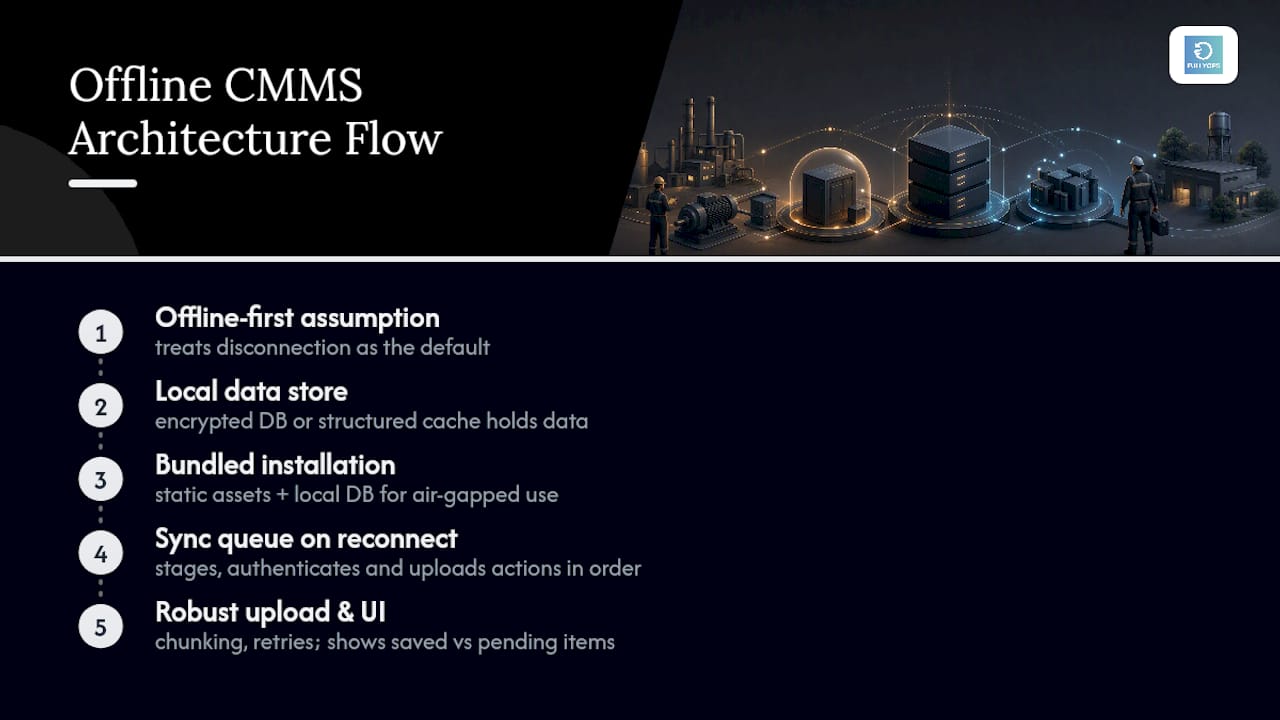
Offline-first design is the industry term for what most people mean when they say “modo offline CMMS.” It flips the usual assumption: instead of treating the network as always available and offline as an exception, the app assumes disconnection is normal and treats a live connection as the bonus case. That single design choice determines whether a technician loses half a shift’s work in a basement with no signal, or simply carries on.
Under the hood, the app needs a local data store on the device, whether that is an encrypted SQLite database or a structured local cache, holding open work orders, checklists, asset history and reference manuals for the sites a technician is likely to visit. The GMAO-FACTORY project demonstrates this pattern well: by bundling static assets and a local database into the installation, the system stays fully operational in air-gapped or intranet-only environments, with no dependency on a live server.
When the device reconnects, a sync queue takes over. Each completed action, whether a finished checklist or a logged meter reading, gets staged, authenticated and uploaded in order, with automatic retries if the connection drops mid-transfer. Chunking large uploads (photos especially) prevents a single failed packet from blocking the whole queue. The mobile interface should always show which items are saved locally and which are still pending, so a technician never has to guess whether a job actually went through. Device storage matters too. A fleet running dozens of asset manuals and weeks of cached history needs more headroom than a single site running light checklists.
Which CMMS features typically work offline
Not every feature survives disconnection equally well, and setting the right expectations upfront saves a lot of confusion during rollout. Most mature mobile CMMS apps support a consistent core set of offline capabilities:
- Work orders and checklists: technicians can create, update and mark tasks complete offline, exactly as they would on a live connection.
- Photos, signatures and readings: cameras, digital signature capture and meter readings all save locally, ready to attach once synced.
- QR and barcode scanning: scan-first identification of assets works entirely offline, which speeds up logging and reduces manual typing errors, a point PreventiveHQ flags as decisive for real-world field productivity.
- Spare parts reservation: technicians can flag parts used or reserved offline, though most platforms hold the actual stock deduction until sync, to avoid double counting across simultaneous edits.
- Cached manuals and asset history: reference documents and past service records stay available locally, useful for diagnosing repeat faults on-site.
What doesn’t work offline is just as important to plan around: live alerts, cross-technician notifications and up-to-date analytics dashboards typically depend on server connectivity, so managers should not expect real-time visibility until devices sync. Practical fields for offline capture, including photos, signatures and scan-based identification, are now fairly standard across mobile CMMS products.
Synchronisation, conflict resolution and the audit trail
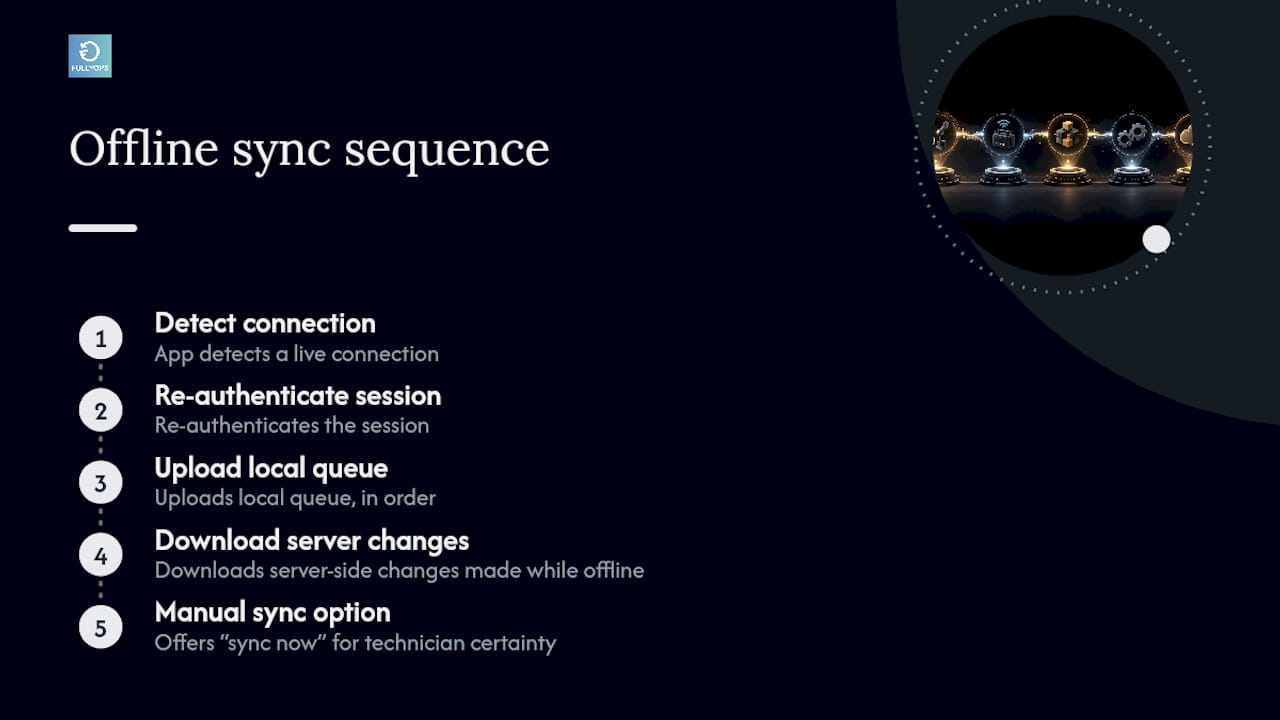
Sync itself follows a predictable sequence: the app detects a live connection, re-authenticates the session, uploads the local queue in order, then downloads any server-side changes made while the device was offline. Most platforms run this automatically in the background, though a manual “sync now” option matters when a technician needs certainty before leaving a site.
Conflicts arise when two technicians edit the same asset or work order while both are offline. Some systems apply a simple last-write-wins rule; more careful implementations flag the conflict and route it to a supervisor for a manual decision, particularly for anything touching safety-critical checklists or spare-parts stock levels. A CMMS that silently overwrites one technician’s entry with another’s is a real operational risk, so this is worth testing before rollout rather than after.
Traceability depends on the metadata attached to every offline entry: a timestamp for when the action actually happened (not when it synced), the user ID who performed it, and a version marker if the record was edited more than once before upload. This is what keeps an offline-created work order defensible in an audit, matching the traceability that platforms like CMMS, LMS and EAM systems are designed to provide for equipment history. Testing sync reliability, including deliberately interrupted uploads and simultaneous edits during a pilot, catches most of these edge cases before they become live incidents.
Implementation checklist for reliable offline workflows
Rolling out offline capability well is less about the software and more about the operational discipline wrapped around it. A practical rollout sequence looks like this:
- Set a device policy with minimum specs (storage, battery life, camera quality) and specify rugged devices for sites with drops, dust or extreme temperatures.
- Build a pre-shift sync routine so every device confirms it holds the latest work orders and asset data before a technician heads offsite.
- Design the mobile UI around scanning, not typing to cut data entry errors, following the work order best practices that reduce friction on small screens.
- Define a network recovery policy: decide which actions auto-sync the instant a signal appears and which wait for a manual trigger.
Monitor pending queues centrally so a supervisor sees stuck items before a technician moves to the next job. - Audit local caches periodically and back them up, since a lost or damaged device shouldn’t mean lost work history.
If the app survives that combination, it will survive most real shifts.*
Where offline CMMS actually pays off
Field teams working in basements, plant rooms, remote worksites or on fleet vehicles feel the difference immediately once offline capability is in place. Jobs that used to wait for a signal now get logged the moment they’re finished, which shortens mean time to repair because nothing sits in a technician’s memory until they’re back near Wi-Fi.
Data quality improves over paper-based logging too, since every entry carries a timestamp and user ID automatically rather than relying on handwriting deciphered days later. Temporary installations and fleet vehicles benefit particularly, given how unpredictable coverage is on the move, making integrated solutions like Moto Watchdog essential for effective fleet tracking and management. Three metrics are worth tracking after rollout: the volume of offline work completed, the sync success rate once devices reconnect, and overall data completeness compared with your pre-offline baseline.
What Fullyops brings to offline field maintenance
Some offline-capable platforms are built around the principles maintenance managers should specify, including mobile work order management, cached checklists, and technician workflows that keep operating without a live connection. The mobile field service capabilities map directly onto the implementation checklist above, from device-level data capture to structured sync monitoring. Fullyops has reported measurable operational gains tied to broader digital maintenance adoption, including efficiency and downtime improvements when mobile and offline workflows replace paper-based logging.
Weighing feature parity against procurement reality
Full offline feature parity sounds ideal until you price it against training time and device cost. My honest recommendation: require full offline write access for work orders, checklists and readings, since that’s where most field time is lost. Live analytics and cross-team alerts can reasonably wait for sync. Pilot on one site before a full rollout. It exposes sync conflicts and device quirks while the stakes are still low.
— Pedro
Ready to specify offline capability properly?
Most CMMS buyers discover the hard way that “works offline” and “works reliably offline” are different promises, usually after a technician loses a shift’s data in a basement with no signal. Some platforms approach this the other way round: mobile-first work order management, cached checklists and structured sync monitoring are built into the core platform rather than bolted on as an afterthought, which means field teams get the same tool whether they’re on-site with full coverage or three floors underground with none. If you’re specifying or piloting offline capability for your maintenance operation, the field service management platform is the natural place to start. Book a demo, run it against your worst-coverage site first, and judge it there.
FAQ
Is CMMS the same as SAP?
No. CMMS is a category of maintenance management software; SAP is a large enterprise resource planning suite that includes a maintenance module (SAP PM) as one part of a much broader system. Most maintenance teams find a dedicated CMMS faster to deploy and simpler to run day-to-day than a full SAP implementation.
What CMMS software is best for maintenance?
The right choice depends on fleet size, site complexity and whether offline mobile access matters to your operation. Platforms like Fullyops focus specifically on work order management, preventive scheduling and mobile field workflows for industrial and facility maintenance teams.
How long does it take to learn CMMS?
Technicians typically become comfortable with core CMMS functions such as creating and closing work orders within a few days of hands-on use, especially with scan-first mobile design. Full proficiency with reporting, inventory and analytics features usually takes a few weeks of regular use.
Is there any open-source CMMS software available?
Yes, open-source CMMS projects exist, including examples like GMAO-FACTORY, which demonstrates offline-first architecture with local databases. These typically require more in-house technical setup than a hosted commercial platform.