

A well‑scoped CMMS migration replaces scattered spreadsheets or a dying legacy system with one source of truth for assets, preventive maintenance and spares. Get the data audit right and the payoff is measurable: fewer reactive jobs, faster MTTR, tighter parts control. Assign a maintenance lead, IT partner and executive sponsor now, then start with a data audit or a small pilot migration before anything else moves.
TL;DR:
- Proper scope and a small pilot ensure the migration timeline remains manageable and prevent delays caused by attempting to move everything at once.
- Data quality issues such as duplicate records, incomplete fields, and orphaned work orders can significantly compromise migration success if not addressed during the audit and cleansing phases.
- Testing the migration in a sandbox environment with varied scenarios uncovers schema mismatches and business rule gaps, reducing the risk of errors in production.
- A structured, parallel run of the legacy and new systems for 30 to 60 days is essential to identify and fix issues in PM triggers and work order links before full deployment.
- Ongoing support, issue logging, and KPIs tracking in the first 90 days post-go-live are critical to ensuring the system delivers measurable improvements and sustained user adoption.
Table of Contents
- Why migrate: what a successful CMMS migration actually delivers
- Pre-migration assessment: scope, stakeholders and data audit
- Data migration best practices: mapping, cleansing and pilot testing
- Implementation and integration: configuration, interfaces and go-live
- User adoption, training and change management
- Post-migration optimisation and KPIs to track
- How Fullyops supports your migration
- Risk management and mitigation strategies during CMMS migration
- Backup and disaster recovery plans prior to migration
- Integration challenges with other enterprise systems (ERP, SCM)
- Post-migration support and troubleshooting processes
- Author perspective: common traps and pragmatic priorities
- Start a pilot: book a demo or run a readiness assessment
- Sources
- FAQ
Why migrate: what a successful CMMS migration actually delivers
Migration is not an IT project bolted onto maintenance. It is an operational decision, and the return shows up in numbers your finance director will recognise: less unplanned downtime, fewer reactive work orders, and inventory that finally matches what is actually on the shelf. Teams running cloud-based maintenance software commonly report double-digit gains in technician efficiency once preventive schedules stop living in someone’s memory.
Three signals tell you it is time to move:
- Spreadsheets have outgrown their purpose, with broken formulas, no audit trail, and no link between an asset and its work history.
- Your legacy CMMS is reaching end of life, unsupported, or too rigid to add new asset classes or sites.
- You are consolidating multiple facilities onto one platform and need consistent reporting across sites.
A realistic migration runs several weeks depending on asset count and site complexity, not counting a phased rollout across multiple plants. The core stakeholder group is small by design: a maintenance lead who owns the data and workflow decisions, an IT contact who handles integrations and security, and a sponsor with the authority to resolve disputes about scope. Adding more voices early tends to slow decisions rather than improve them.
Pre-migration assessment: scope, stakeholders and data audit
Before any vendor conversation goes further than a demo, scope the project tightly enough that it can actually finish. Trying to migrate every asset, every site, and every historical record on day one is the single most common reason timelines double.
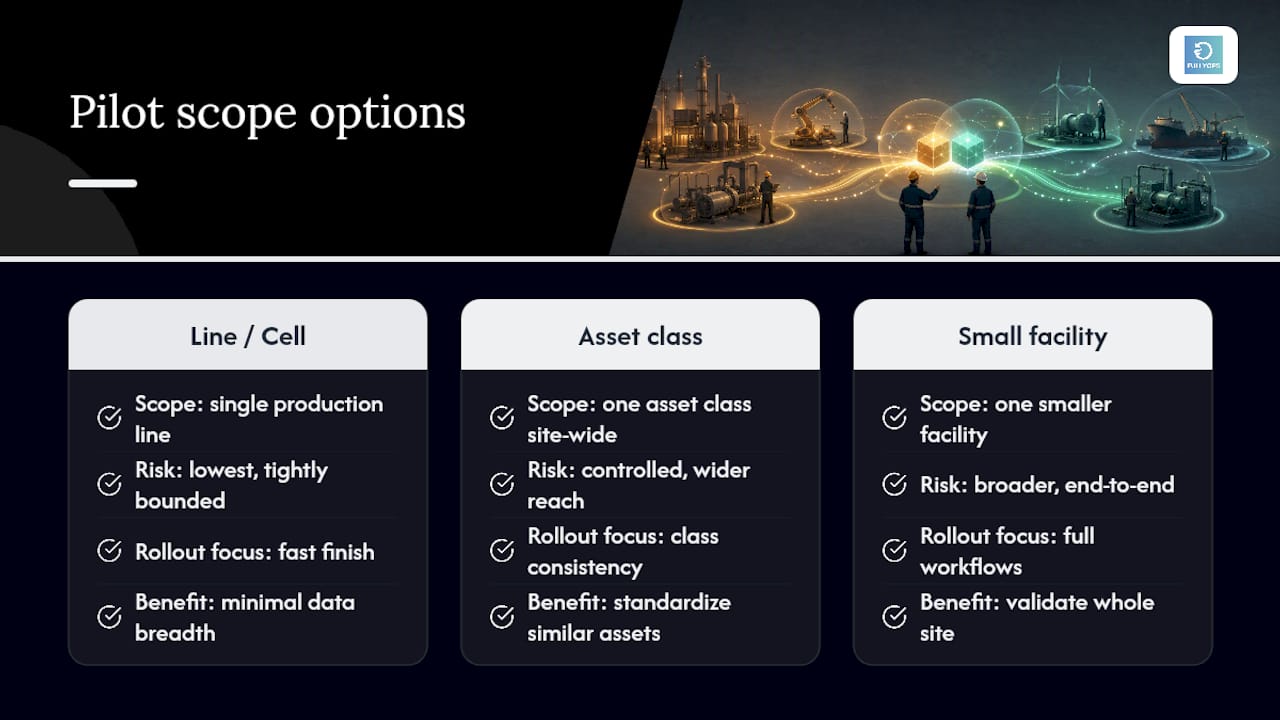
Pick a pilot scope using one of three approaches: a single production line or cell, one asset class across the site, or one smaller facility; each option offers different benefits based on your goals and risk tolerance.
Governance stays lean: the maintenance lead makes data decisions, IT owns access and integration questions, and the sponsor signs off on scope changes. Meet weekly during the assessment phase, not daily. Frequent short syncs beat long status meetings.
The data audit itself has a clear sequence. Export your asset register, PM schedules, work order history, and spare-parts inventory from every legacy source, including the shadow spreadsheets nobody officially admits to using. Then measure completeness: what percentage of assets have a valid location, criticality rating, and parent-child hierarchy? What percentage of PM tasks have a defined frequency and assigned trade? Guides on CMMS data migration consistently flag incomplete or careless exports as the point where migrations go wrong, corrupting records long before anyone notices.
Rank fields by priority. Asset ID, location, and criticality are non-negotiable. Historical work order notes older than three years are usually a nice-to-have, not a blocker.
A quick sample check often reveals data problems that a headline export summary hides completely.*
Data migration best practices: mapping, cleansing and pilot testing
This is the highest-risk phase of any CMMS migration, and it deserves its own budget and timeline rather than a line item inside “implementation.” Guides analysing CMMS data migration failures point to the same recurring culprits: duplicate asset records, missing required fields, and orphaned work orders with no parent asset. All three are preventable with a disciplined sequence.
Start with a field mapping document. Every legacy field needs an explicit destination in the new CMMS, along with the transformation rule that gets it there.
| Legacy field | New CMMS field | Transformation rule |
|---|---|---|
| Asset Tag (free text) | Asset ID | Strip spaces, enforce uppercase, prefix by site code |
| Equip Type (abbreviated) | Asset Class | Map against a controlled vocabulary list |
| Last PM Date (text) | Last PM Completed | Convert to ISO date format |
| Vendor Name (varied spelling) | Supplier ID | Match against deduplicated supplier master list |
Naming and nomenclature standards need to be defined before, not during, the import. Decide on a single asset-numbering convention, a controlled list of criticality tiers, and consistent trade codes. Once the new CMMS is live, enforce these with validation rules at the point of entry, so legacy inconsistencies cannot creep back in through a technician’s typo.
Deduplication is where most teams underestimate the effort. Merge duplicate asset records rather than deleting either version outright, so you preserve the maintenance history attached to both. For records with genuinely low value, an approach recommended in broader CMMS migration guidance is to archive anything beyond a defined retention threshold, commonly three to five years, rather than importing every historical line item into the live system.
Then pilot. Run the migration into a sandbox environment at least twice before touching production data. Test cases should include:
- A high-criticality asset with a complex parent-child hierarchy.
- An asset class with unusual or legacy-only fields.
- A PM schedule with a non-standard frequency (seasonal or usage-based, not just calendar-based).
- A record with known data quality problems, to confirm your cleansing rules actually catch it.
Iterative pilots tend to surface schema mismatches and business-rule gaps invisible in a flat export file, which is exactly why running the process once is not enough.
Only move to full migration once the sandbox pilot clears all three.
Pro Tip: Keep the sandbox environment live for at least two weeks after go-live. When a field mapping issue surfaces in production, you will want a clean environment to reproduce and fix it without touching live data.
Implementation and integration: configuration, interfaces and go-live
Configuration should happen in a staging environment, never directly in production, and the sequencing matters more than most teams expect.
- Configure core workflows first — work order types, approval chains, and PM triggers, tested against the pilot data already validated in the sandbox.
- Sequence integrations by dependency, not convenience. ERP integration for parts and purchasing usually comes first, since inventory accuracy depends on it. Sensor or IoT feeds come next, once the asset hierarchy they attach to is stable.
- Write a test plan for each interface separately. An ERP sync test is not the same as a sensor feed test; each needs its own pass/fail criteria and its own rollback plan.
- Configure IoT and automation pipelines during migration itself, not as a later add-on. Migration guidance on ingesting live data during migration notes this gives you a baseline of asset health from day one, rather than a gap while sensors get bolted on afterwards.
- Run a parallel operation period of 30 to 60 days, with both the legacy and new systems live simultaneously. Assign one steward to triage discrepancies daily rather than letting them pile up for a weekly review.
- Monitor PM trigger accuracy and work order linkage specifically during the parallel run, since these are the two areas most likely to silently misfire.
- Define fallback steps in advance: if the new system fails a critical check during parallel run, know exactly who reverts to the legacy process and for how long, before you need that answer under pressure.
This structure echoes the seven-step CMMS implementation model that treats data migration and configuration as distinct, sequential phases rather than one blurred effort, with user adoption and optimisation following only once the technical foundation holds, a method supported by various construction software for HVAC contractors that streamline field operations and digitised workflows.
For a mid-sized industrial site with a moderate number of assets, expect a realistic timeline of several weeks from kickoff to full cutover, with a small dedicated team including maintenance, IT, and super-user roles.
User adoption, training and change management
The best data migration in the world fails if technicians keep filling out paper tickets on the side. Training has to be role-specific, not a single generic session for everyone.
- Technicians need a short, task-focused job aid: how to open, update, and close a work order on a phone or tablet, nothing more.
- Planners need deeper training on PM scheduling logic, parts reservation, and how the new criticality tiers affect prioritisation.
- Managers need to understand the reporting dashboards and how to read the KPIs the migration was supposed to improve.
Identify two or three power users per shift before go-live and train them a week ahead of everyone else. A cascade model, where power users field peer questions on the floor, resolves far more friction in week one than a helpdesk ticket ever will.
Track adoption with concrete metrics such as work orders logged in the new system versus other methods, PM completion rate, and login frequency by role. If compliance is low after the first month, the issue often involves workflow usability rather than training alone. It is more often a workflow that takes too many taps to complete a common task.
Pro Tip: Put a “report a problem” button directly inside the new CMMS during the first 90 days. Technicians who have to leave the app to complain about the app usually just stop using it instead.
Post-migration optimisation and KPIs to track
The first 90 days after go-live are where you prove the migration delivered what it promised, not just that data moved from one system to another.
Run structured checks at 30, 60, and 90 days. At day 30, confirm your data integrity score, PM compliance rate, and work order accuracy against the acceptance criteria set during pilot testing. At day 60, look for drift: are technicians logging complete data, or has shorthand crept back in? At day 90, compare business KPIs against your pre-migration baseline.
A useful benchmark: organisations using digital work order systems after a structured migration commonly see reactive work orders drop as a share of total volume, since preventive tasks finally fire on schedule rather than depending on someone remembering a spreadsheet reminder.
Review cadence matters as much as the metrics themselves. Weekly reviews for the first month, then monthly, keep the continuous improvement loop alive without turning it into another meeting nobody attends. Track MTTR, PM compliance, and inventory accuracy as your core three, and revisit field mapping decisions if any KPI stalls rather than assuming the platform itself is the problem.
How Fullyops supports your migration
This migration process involves tasks such as asset and PM data import, sandbox-style staged rollout, and role-based configuration for technicians, planners and managers. A practical pilot checklist looks like a readiness assessment of your legacy data, a staged import into a test environment, and a phased rollout by site or asset class, mirroring the sequence outlined above rather than a single big-bang cutover.
Risk management and mitigation strategies during CMMS migration
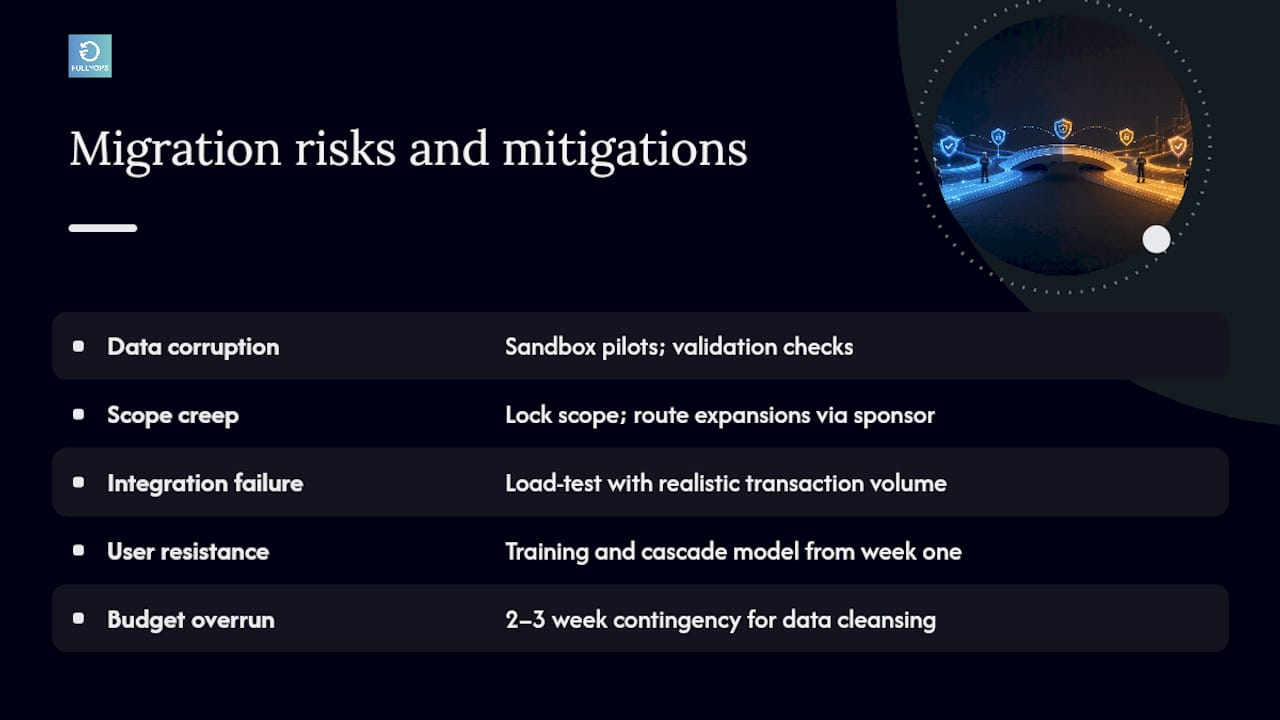
Every migration carries risk, but the risks are predictable enough to plan for rather than merely hope around. The biggest is data corruption during bulk import, mitigated by the sandbox pilots and validation checkpoints already covered. The second is scope creep, where “just one more asset class” quietly triples the timeline. Lock scope at the governance stage and route any expansion request through the sponsor, not the project team directly.
Integration failure is the third major risk, particularly where an ERP or inventory system has its own data quirks that only surface under real transaction volume. Test each integration against a realistic transaction load in staging, not a handful of sample records, before trusting it in production.
User resistance deserves its own line on the risk register. A technically flawless migration that nobody adopts delivers zero value, so build the training and cascade model into the project plan from week one rather than treating it as an afterthought once configuration finishes.
Finally, budget and timeline overrun is common enough to plan for explicitly. Guidance on treating data migration as its own project with its own timeline, separate from the broader implementation, exists precisely because normalisation work routinely takes longer than anyone estimates on a kickoff call. Build in a contingency of two to three weeks specifically for data cleansing, and treat hitting that buffer as normal rather than a sign something has gone wrong.
Backup and disaster recovery plans prior to migration
Before a single record moves, take a full, verified backup of every legacy data source: the CMMS database if you have one, all spreadsheets, and any linked documents like PM checklists or asset manuals. Store it somewhere separate from the live systems, and confirm the backup actually restores correctly before you rely on it. A backup nobody has tested is not a backup.
Keep the legacy system, whether that is a database or a well-organised set of spreadsheets, in a read-only but accessible state for at least the duration of the parallel run. If the new CMMS surfaces a data problem in week three, you need a way to check what the original record actually said.
Define a rollback trigger in advance: a specific, agreed threshold, such as data integrity dropping below a set percentage or a critical integration failing outright, at which point the team reverts to the legacy process rather than pushing forward and hoping the issue resolves itself. Assign one person the explicit authority to pull that trigger. Migrations tend to drift into extended chaos precisely when nobody has that authority clearly defined, and everyone waits for someone else to make the call.
Document the recovery procedure itself: who restores from backup, how long it takes, and what happens to work logged in the new system during the outage. This is not paperwork for its own sake. It is the difference between a contained hiccup and a week of lost maintenance history.
Integration challenges with other enterprise systems (ERP, SCM)
ERP and supply chain integrations are where CMMS migrations most often stall, because the two systems rarely agree on what a “part” or a “supplier” actually is. Your ERP might track a component by a purchasing SKU, while your legacy maintenance records reference it by a plain-language description. Reconciling the two requires a supplier and parts master list built specifically for the migration, not assumed to already exist cleanly on either side.
Timing the sync matters as much as the mapping itself. Decide whether the CMMS will be the system of record for parts consumption, with the ERP simply reflecting stock levels, or whether the ERP stays authoritative and the CMMS only requests parts. Ambiguity here causes double-counted inventory or missed reorder points within weeks of go-live.
Test the integration under real transaction volume, not a handful of sample work orders. A sync that works fine for ten test records can choke or silently drop entries at production scale, particularly with older ERP systems using batch rather than real-time updates. Build in a reconciliation report that flags any part or purchase order that fails to sync, and review it daily during the first month.
SCM integration adds a further wrinkle for multi-site organisations: a part might be common across sites but priced or sourced differently by location. Map that variation explicitly rather than assuming a single global part record will hold up.
Post-migration support and troubleshooting processes
Support does not end at go-live. The first 30 days need a clearly named point of contact, ideally the same steward who ran the parallel-run reconciliation, who technicians and planners can reach directly rather than filing a ticket into a generic queue.
Log every issue during this period, even small ones. A pattern of minor complaints, such as a dropdown missing an option or a report pulling the wrong date range, often points to a mapping decision made earlier in the project that needs a second look. Fixing the pattern is more valuable than patching each symptom individually.
Set a response time expectation for critical issues, such as a broken PM trigger or a failed integration sync, versus cosmetic ones. Critical issues affecting safety or compliance work should get resolution within hours, not days. Review the issue log weekly for the first two months, then fold it into the standard 30/60/90 day check already covering broader KPIs.
Author perspective: common traps and pragmatic priorities
Teams consistently underestimate two things: how long data cleansing actually takes, and how much adoption depends on the first two weeks, not the training session itself. Invest disproportionately in data hygiene and pilot validation before configuration debates. Everything downstream, reporting, automation, ROI, depends on records being right first.
— Pedro
Start a pilot: book a demo or run a readiness assessment
Spreadsheets and dying legacy systems have real limits, but so does a rushed CMMS switch with no pilot behind it. A staged path is recommended for maintenance teams: a readiness assessment against your own asset data, a sandbox import to catch mapping problems before they touch production, and role-based configuration for technicians, planners, and managers from day one. That means less guessing about whether your data is clean enough and fewer surprises during cutover. The immediate step is the same one covered throughout this guide: run a data audit or a small pilot migration before committing to a full rollout. Start that pilot with a work order management assessment built around your own site data, and use the results to plan the wider rollout with confidence.
Sources
- Data Migration Best Practices When Adopting a New CMMS
- CMMS Data Migration: The Step Everyone Gets Wrong — HTMwire
FAQ
What is CMMS migration?
CMMS migration is the process of moving asset, maintenance, and inventory data from spreadsheets or a legacy system into a new computerised maintenance management platform, including cleansing, mapping, and validating that data before go-live.
How long does a CMMS migration take?
For a mid-sized industrial site with a moderate number of assets, expect a realistic timeline of several weeks from kickoff to full cutover, depending on data quality and how many integrations, such as ERP or IoT feeds, need configuring alongside the core system.
What causes most CMMS migrations to fail?
Duplicate asset records, missing required fields, and orphaned work orders are the most common causes, usually traced back to skipping a proper data audit and cleansing phase before bulk import.
Should we run the old and new systems in parallel?
Yes. A parallel run of 30 to 60 days, with both systems live and a designated steward reconciling discrepancies daily, catches PM trigger and work order linkage errors before they affect production.
Can Fullyops help with a CMMS migration pilot?
A staged migration approach is supported, including a readiness assessment, sandbox import, and phased rollout by site or asset class, matching the pilot-first sequence recommended throughout this guide.