

Integrating IoT with a CMMS turns raw sensor events into condition-based work orders, cutting unplanned downtime and shrinking response times. It works by feeding vibration, temperature, and location data through an analytics layer that triggers alerts directly inside your maintenance platform. Some established CMMS platforms support this model. The rest of this guide covers exactly how to build it, avoid the common failure points, and run a pilot that actually scales.
TL;DR:
- Properly reconciling asset IDs and naming conventions before data flow starts is critical to avoid orphaned alerts or incorrect asset tagging.
- Starting with a focused pilot asset and conservative thresholds helps manage false positives and builds technician trust in automated alerts.
- Integrating RTLS is essential mainly in facilities where search time significantly impacts response, but condition sensors alone can suffice for easier-to-locate assets.
- Most failures occur due to mismatched asset hierarchies and untuned alert thresholds, which can be fixed with careful planning and initial testing.
- FullyOps supports creating automated work orders via API or webhook but recommends human-in-the-loop approval during early pilots to prevent false alarms.
Table of Contents
- What is a CMMS and why does it matter for maintenance operations?
- What does IoT mean in a CMMS context?
- Why pilot IoT-enabled predictive maintenance now?
- What are the key components of an IoT-enabled CMMS stack?
- How does the integration actually work, step by step?
- What are the practical use cases across industries?
- What challenges commonly derail IoT-CMMS integration?
- What does a best-practice implementation checklist look like?
- How does FullyOps support IoT-enabled maintenance workflows?
- Automation still needs a human checking its work
- Ready to run your own IoT-CMMS pilot?
- Sources
- FAQ
What is a CMMS and why does it matter for maintenance operations?
A computerised maintenance management system is your canonical asset register: every machine, its work order history, its preventive maintenance schedule, and the parts consumed against it, all in one place. Maintenance teams rely on it daily for scheduling, spares availability, compliance records, and the audit trail regulators or auditors ask for.
When you integrate IoT, the CMMS becomes the destination system for machine-generated events, not just a database technicians update manually. It’s where:
- Sensor alerts convert into actual, trackable work orders
- Technicians see asset history alongside live condition data
- Managers pull compliance and performance reports from a single source
Without this target system, IoT data is just noise with nowhere useful to land.
What does IoT mean in a CMMS context?
IoT in maintenance covers three signal types: condition sensors (vibration, temperature, current draw), binary sensors (door open/closed, flow interrupted), and location technologies like RTLS and RFID. Each feeds different maintenance workflows, and mixing them up early causes confusion later.
Gateways sit between the sensors and your network, doing edge preprocessing so raw readings don’t flood the system with noise. The gateway’s job is to:
- Aggregate readings from multiple sensors on one asset
- Filter obvious noise before it reaches the analytics layer
- Tag each reading with the correct asset ID so it maps cleanly to a CMMS record
RTLS specifically solves a different problem than condition monitoring. It tells technicians exactly where an asset physically is, which matters enormously in large facilities where search time eats into response time.
Why pilot IoT-enabled predictive maintenance now?
The business case rests on three measurable gains: less unplanned downtime, faster and better-prioritised work orders, and tighter energy or capital use. Each translates into a KPI your finance team will recognise.
- Extended mean time between failures (MTBF) — condition-based triggers catch bearing wear, overheating, or abnormal current draw before catastrophic failure, rather than waiting for a fixed calendar interval.
- Faster mean time to repair (MTTR) — automated work orders arrive pre-populated with asset ID, fault code, and location, cutting the diagnostic guesswork technicians usually do on arrival.
- Lower administrative load — work orders generate themselves from thresholds instead of a planner manually reviewing sensor dashboards and typing tickets.
- Better capital and energy utilisation — run-hours and load data reveal which assets are over-maintained on fixed schedules and which are quietly running hot.
Predictive shift: integrating RTLS and IoT data with a CMMS is what converts a reactive maintenance model into a condition-based one, provided an analytics layer sits between the sensors and the CMMS itself.
What are the key components of an IoT-enabled CMMS stack?
Before procuring anything, map out the five layers your architecture needs. Skipping one usually means retrofitting it later at higher cost.
- Edge sensors and RTLS tags — the physical hardware capturing vibration, temperature, or location
- Network layer — LPWAN, Wi-Fi, or wired connections carrying readings to a gateway
- Gateways — devices that aggregate, filter, and forward readings
- Ingestion and analytics — streaming pipelines, a rules engine, and anomaly detection that decide what counts as an alert
- Integration surfaces — APIs, webhooks, or MQTT brokers connecting analytics output to the CMMS, plus the mobile client technicians actually use in the field
Pro Tip: Don’t buy the analytics layer as an afterthought. It’s the single component most vendors underestimate, and it’s the one that decides whether your alerts are useful or just noisy.
How does the integration actually work, step by step?
The event pipeline follows a consistent pattern regardless of industry or sensor type, though the specific thresholds and approval logic vary by asset criticality.
- A sensor captures a reading (vibration spike, temperature rise, door left open).
- The gateway aggregates and forwards it, tagged to a specific asset ID.
- The analytics layer applies rules or anomaly detection to decide whether the reading crosses an actionable threshold.
- If it does, the system calls the CMMS API or fires a webhook, creating or updating a work order automatically.
- A technician receives the work order on a mobile device, often with location data attached if RTLS is in play.
Designing the triggers is where most of the engineering effort goes. Simple threshold rules work for well-understood failure modes; anomaly detection suits assets where “normal” varies by load or season. Some triggers should include a human-in-the-loop approval step, especially early in a pilot, rather than auto-dispatching every alert.
Time synchronisation and data normalisation between sensor tags and the CMMS asset hierarchy matter more than most teams expect. A reading that arrives with an inconsistent timestamp or an unmatched tag ID either gets dropped or, worse, attached to the wrong asset. Safety-critical or fast-failure signals need low-latency alerting; trend data for non-critical assets is better handled in batch, which also reduces the load on your analytics pipeline.
What are the practical use cases across industries?
The underlying architecture stays the same across sectors; only the sensor mix and trigger logic change.
- Manufacturing — vibration and temperature sensors on rotating equipment trigger bearing replacement orders before a breakdown stops the line, as described in this tool life monitoring example for CNC production.
- Facilities management — RTLS combined with door and motion sensors speeds up emergency response and gives auditors a clean, timestamped trail.
- Fleets — telematics feed fault codes and mileage into scheduled service orders, replacing guesswork with data-driven intervals.
- Calibration and tool custody — RFID and RTLS track high-value tools and instruments, preventing out-of-calibration equipment from being used and keeping the compliance record intact.
What challenges commonly derail IoT-CMMS integration?
Most failures trace back to a handful of predictable causes, all fixable with planning rather than better hardware.
- Asset hierarchy mismatches — if a sensor tag doesn’t map cleanly to a CMMS asset record, alerts either orphan or attach to the wrong equipment.
- Alert fatigue — poorly tuned thresholds generate too many false positives, and technicians start ignoring the system entirely.
- Connectivity gaps — gateways in poor signal areas drop readings silently unless you build in retry logic and monitoring.
- Unclear governance — nobody has decided who owns trigger tuning or who approves auto-generated work orders, so accountability disappears.
Pro Tip: Treat tag reconciliation as a one-time but non-negotiable data-cleaning project. Skipping it is the single most common reason IoT pilots stall before roll-out.
What does a best-practice implementation checklist look like?
Run the pilot as a staged process with clear exit criteria at each gate, rather than a single big-bang rollout.
- Pick one focused pilot asset or asset class and define your target KPIs (MTTR, MTBF, false-positive rate) before writing a single integration rule.
- Reconcile and standardise asset IDs and naming conventions across the CMMS and sensor platform before any data starts flowing.
- Set initial thresholds conservatively and involve technicians in reviewing early alerts. Their field judgement catches false positives that a rules engine alone will miss.
- Build mobile workflows so technicians receive, act on, and close work orders from the field, not from a desktop back at the office.
- Apply an acceptance gate before scaling — only extend to more assets once false-positive rates and KPI improvements meet your predefined targets.
Pro Tip: A staged rollout with tagging, configuration, and infrastructure phases run separately beats trying to launch sensors, analytics, and CMMS integration all at once.
How does FullyOps support IoT-enabled maintenance workflows?
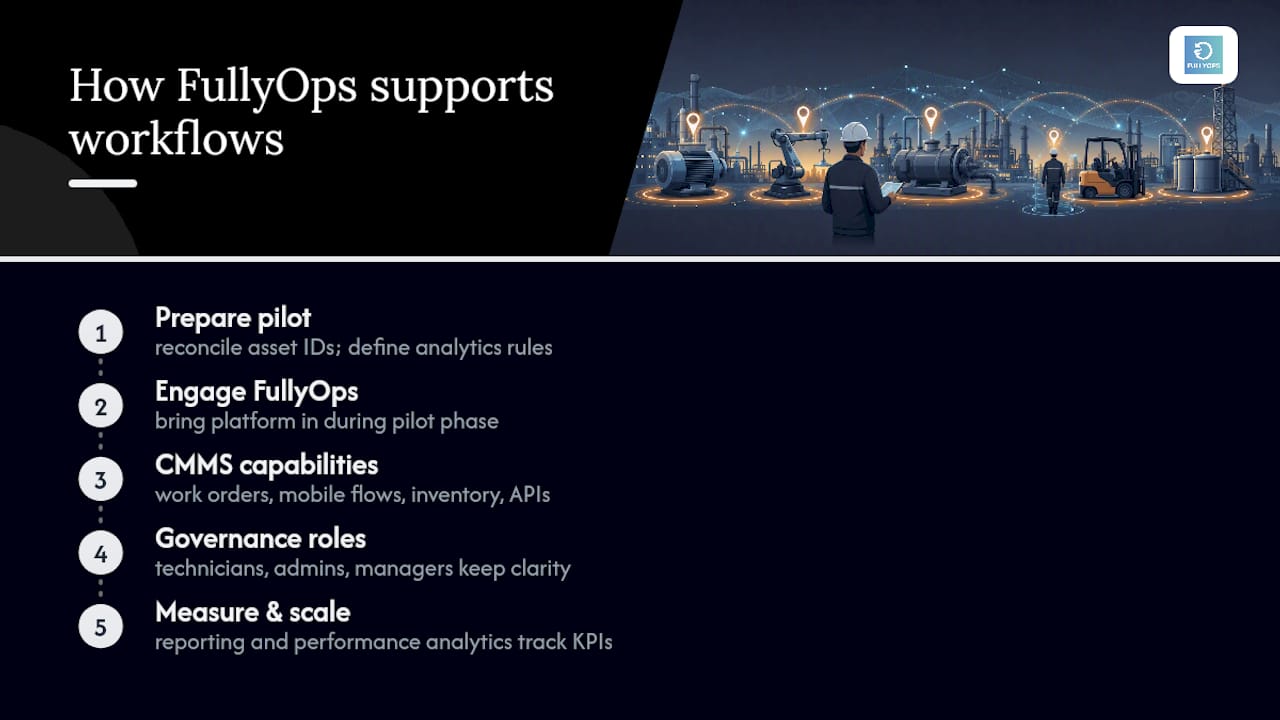
FullyOps handles the CMMS side of this checklist directly: work order management, technician mobile workflows, inventory tracking, and API integrations that connect to sensor and analytics platforms. Roles for technicians, admins, and managers keep governance clear, which matters once automated work orders start appearing in the queue.
Teams typically bring FullyOps in during the pilot phase, once asset IDs are reconciled and analytics rules are defined, using its reporting and performance analytics to track the KPI improvements that justify scaling further.
Automation still needs a human checking its work
The temptation with any IoT pilot is to let the system auto-dispatch every alert from day one. That’s a mistake. Start with conservative thresholds, keep technicians reviewing early alerts, and only automate fully once the false-positive rate earns that trust. Measurement doesn’t stop at go-live either. Update your SOPs as the data teaches you something your original thresholds got wrong, and treat the pilot’s KPIs as a living target, not a one-off report.
— Pedro
Ready to run your own IoT-CMMS pilot?
Where a spreadsheet or a disconnected sensor dashboard leaves you manually chasing alerts, FullyOps gives maintenance teams one platform where work orders, technician workflows, and integration APIs already sit together. That means less time building glue code between your IoT analytics and your maintenance records, and more time acting on what the sensors actually tell you. If you’re planning a pilot along the lines described above, FullyOps’s field service management tools are built to handle the work order automation and technician mobile access that stage requires. Book a demo to see how your own asset hierarchy would map onto the platform before you commit to sensor hardware.
Sources
FAQ
What is the fastest way to start integrating IoT with a CMMS?
Pick one pilot asset, define your target KPIs, and reconcile its asset ID and naming convention with your sensor platform before any data flows.
Do I need RTLS for every IoT-CMMS integration?
No. RTLS matters most when technician search time is a real cost; a simple condition sensor without location data can still work well for fixed, easy-to-find equipment.
What causes most IoT-CMMS integration failures?
Mismatched asset hierarchies and untuned thresholds are the two most common causes, both of which lead to orphaned alerts or alert fatigue.
Can FullyOps handle automated work orders from IoT triggers?
Yes, FullyOps supports API and webhook integrations that let analytics platforms create or update work orders automatically once thresholds are crossed.
Should alerts always create a work order automatically?
Not initially. Early in a pilot, route alerts through a human-in-the-loop approval step until the false-positive rate is low enough to trust full automation.