

En bref
- Automated service report generation reduces errors, improves efficiency, and creates reliable audit trails for maintenance teams.
- Success depends on standardizing data input fields, separating report templates from scheduling, and integrating directly with existing systems.
Service report automation is the process of generating, formatting, and delivering service reports without manual intervention, using digital platforms and structured workflows. For operations managers and field technicians in maintenance industries, this shift from paper-based or spreadsheet-driven reporting to automated systems means fewer transcription errors, faster client communication, and a reliable audit trail attached to every work order. Tools such as Power BI with Power Automate, GoAudits, and Oracle Fusion Field Service have made this process accessible to maintenance teams of all sizes. The benefits are direct: time savings on administrative tasks, improved data accuracy, and consistent compliance documentation generated at the point of work.

How to automate service reports: understanding the foundations
Automating service reports begins with understanding what the process actually replaces. Manual reporting typically involves a technician completing a paper form or a generic spreadsheet after a job, then emailing it to a supervisor who reformats it before sending it to the client. Each handoff introduces delay and the risk of data loss. Automated report generation removes those handoffs entirely by connecting structured data capture directly to report output and distribution.
The term used across field service platforms is automated reporting, sometimes called report automation or automated report generation. These terms describe the same core workflow: data enters a system through a digital form or integration, a report template processes that data, and the finished document is delivered to the right recipient without anyone manually triggering the process.
The operational gains are significant. Real-time automated reporting enables managers to take immediate action and improves operational oversight across multiple sites and teams. For a maintenance operation running dozens of work orders per week, that visibility is the difference between reactive firefighting and proactive asset management.
What must a service report capture for automation to work?
Automation is only as reliable as the data feeding into it. Standardising key questions and data fields is critical for automation success, and the most practical framework organises those fields around five core questions: Who, What, Where, When, and How.
A well-structured service report for automated generation should include the following seven elements:
- Identification: Technician name, employee ID, and client or site reference
- Time records: Job start time, end time, and total duration
- Diagnosis: Fault description, root cause, and equipment condition at arrival
- Operations performed: Tasks completed, procedures followed, and any deviations from the planned scope
- Materials used: Parts replaced, quantities consumed, and stock reference numbers
- Observations: Notes on asset condition, safety concerns, or recommended follow-up work
- Validation: Technician signature, client sign-off, and timestamp
Each of these fields must be defined as a fixed input type in your digital form, whether that is a dropdown, a date picker, a numeric field, or a text box with a character limit. Free-text fields without constraints are the single most common cause of automation failures, because inconsistent entries break template logic and produce malformed reports.
Conseil de pro : Lock down dropdown options for fields like fault type and materials used before you build your automation. Changing field options after the pipeline is live forces you to update both the form and the report template simultaneously, which doubles the maintenance burden.
Mobile field service apps handle this particularly well. Digital mobile forms enable instant submission of service reports, producing a polished PDF automatically after the technician submits the form on-site. This eliminates the delay between job completion and report availability, which in manual workflows can stretch to days.
Which tools enable automatic service report generation?
The technology stack for service report automation follows a consistent pipeline regardless of which specific tools you choose. Automated reporting pipelines require data integration, visualisation, and orchestration working together. Missing any one of those layers causes failures in the automation chain.
The table below compares the three most widely used approaches in maintenance and field service contexts:
| Approche | Primary tools | Convient le mieux à | PDF generation method |
|---|---|---|---|
| BI export and email | Power BI + Power Automate | Operations with centralised data warehouses | API-based export via scheduled flow |
| Mobile form submission | GoAudits, Oracle Fusion Field Service | Field technicians completing on-site reports | Instant PDF on form submission |
| Intégration CMMS | Maintenance management platforms | Asset-heavy operations with work order systems | Template-based generation from work order data |
Power Automate builds a scheduled flow that exports a chosen Power BI report as a PDF and sends it as an email attachment. This approach suits operations managers who need consolidated performance reports distributed to leadership on a fixed schedule, such as weekly maintenance summaries or monthly asset health overviews.
For field technicians, Oracle Fusion Field Service auto-generates a PDF from mobile form data, uploading it to the related work order or cloud storage automatically. This is the stronger choice when the report must be attached to a specific asset record rather than distributed as a standalone document.
The key capability differences to evaluate when selecting tools are:
- Data connectors: Does the tool connect natively to your existing CMMS, ERP, or IoT data sources?
- Template management: Can non-technical staff update report layouts without touching the automation logic?
- Scheduling options: Does the tool support event-triggered delivery (on form submission) as well as time-based scheduling?
- Delivery channels: Can reports be sent via email, Slack, Microsoft Teams, or uploaded directly to a work order?
Step-by-step process to implement service report automation
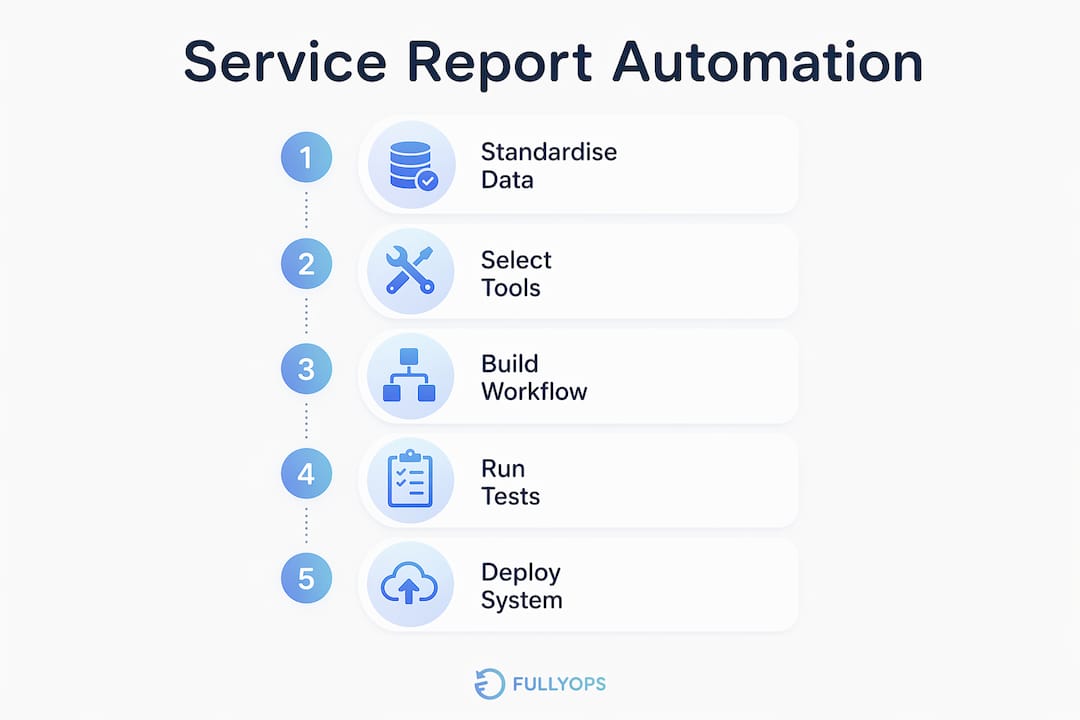
Implementation works best when treated as a phased project rather than a single deployment. The following sequence applies whether you are using a BI-based approach or a mobile form platform.
-
Define and standardise your report fields. Before touching any software, map every data point your reports currently contain. Identify which fields are mandatory for compliance, which are informational, and which can be removed. This audit typically reduces field count by 20 to 30 per cent, which directly improves technician completion rates.
-
Select your reporting tool and data integration method. Match the tool to your data source. If your maintenance data lives in a SQL database or a cloud data warehouse, Power BI with Power Automate is a natural fit. If your technicians work primarily on mobile devices in the field, a platform like GoAudits or a field service management system with built-in form capabilities will serve better.
-
Build your report template separately from your scheduling logic. Separating scheduling logic from report generation reduces system complexity and makes the automation easier to maintain. Embed all formatting, calculations, and conditional logic inside the template itself. The scheduler should do one thing: trigger the export and send it to the right destination.
-
Configure scheduling and distribution. Set up time-based triggers for periodic reports and event-based triggers for on-site reports. For a maintenance team, a practical configuration might be: daily automated summaries emailed to the operations manager at 07:00, plus an instant PDF sent to the client whenever a technician submits a completed job form.
-
Run test cycles before going live. Submit test form entries with edge-case data, including missing optional fields, maximum-length text entries, and unusual part quantities. Verify that the generated PDF matches the expected output and that delivery reaches the correct recipients. Document any failures and trace them back to either the data source, the template, or the distribution configuration.
-
Iterate based on technician and manager feedback. The first live version of an automated report is rarely the final one. Collect structured feedback after the first two weeks of operation, focusing on whether the report contains the right information in the right order for the people receiving it.
Conseil de pro : Run your first automated report in parallel with your existing manual process for two weeks. This lets you catch discrepancies between the two outputs before you decommission the manual workflow, and it builds technician confidence in the new system.
Common challenges and best practices in service report automation
The most frequent failure point in automated reporting is not the technology. It is the quality of data entering the system. Standardising technician input fields before automating is the single most important step to avoid incomplete or error-prone outputs. A report template cannot compensate for a form that allows technicians to enter “N/A”, “none”, or a blank space in a field that the template expects to contain a part number.
The following practices reduce the most common automation failures:
- Use controlled vocabularies. Replace free-text fields with dropdowns or searchable lists wherever possible. This applies to fault categories, equipment types, and materials used.
- Set mandatory field validation at the form level. Do not allow submission of an incomplete form. This is more effective than trying to handle missing data inside the report template.
- Monitor data freshness. If your report pulls from a database that updates on a schedule, confirm that the automation trigger fires after the data refresh, not before it.
- Version your templates. When you update a report layout, keep the previous version available for at least 30 days. Schema changes in the data source can cause older reports to fail, and having a rollback option saves significant time.
“In practice, a typical automation pipeline uses standardised digital forms with locked-down fields feeding directly into templated report generation, ensuring reliable automatic PDFs without manual fixes.” — AntsRoute
Attaching generated PDFs back to work orders is a practice that operations teams sometimes overlook in the initial setup. PDFs generated upon form submission should be attached to work orders to maintain coherent audit trails and reduce reporting discrepancies. This is particularly relevant for industries with regulatory inspection requirements, where the link between a completed task and its documentation must be unambiguous.
How automated reports integrate with maintenance and asset management workflows
Automated service reports deliver their full value when they are connected to the broader operational ecosystem rather than treated as standalone documents. The table below shows how report automation integrates with adjacent maintenance workflows:
| Workflow area | Integration point | Avantage opérationnel |
|---|---|---|
| Gestion des ordres de travail | PDF attached automatically on job completion | Complete documentation linked to each asset record |
| Invoicing | Timestamped report used as billing evidence | Faster invoice approval and reduced disputes |
| Compliance and audit | Geo-tagged, timestamped PDFs stored automatically | Verifiable evidence for regulatory inspections |
| Inventory management | Materials used fields feed stock deduction rules | Real-time inventory accuracy without manual updates |
| Allocation des ressources | Completion data informs scheduling and capacity planning | Better utilisation of technician time across sites |
Linking automated reports with field service efficiency tools creates a feedback loop where completed work orders generate reports, those reports update asset records, and asset records inform the next round of preventive maintenance scheduling. This is the operational model that separates reactive maintenance teams from those running genuinely proactive asset management programmes.
For invoicing specifically, the value is direct. A timestamped, geo-tagged PDF generated automatically at job completion removes the ambiguity that causes invoice disputes. The client receives a document that records exactly when the technician arrived, what was done, and what parts were used, with no opportunity for manual editing after the fact. Pairing this with strategic field service reporting gives operations managers a clear picture of both individual job performance and aggregate service delivery trends.
Principaux enseignements
Automated service report generation succeeds when standardised data capture, a well-structured toolchain, and separated scheduling logic work together as a single pipeline.
| Point | Détails |
|---|---|
| Standardise before automating | Lock down form fields and controlled vocabularies before building any automation logic. |
| Match tools to data sources | Use Power BI with Power Automate for centralised data; use mobile form platforms for on-site field capture. |
| Separate scheduling from templates | Keep the scheduler thin and embed all report logic inside the template for easier maintenance. |
| Attach PDFs to work orders | Linking generated reports to asset records preserves audit trails and supports compliance requirements. |
| Test with edge-case data | Run parallel testing with unusual inputs before decommissioning manual reporting processes. |
Why I think most teams automate in the wrong order
Most operations teams I have worked with approach service report automation by selecting a tool first and then trying to fit their existing reporting habits into it. That sequence almost always produces a system that automates the wrong things. The reports come out on time, but they contain the same inconsistencies and gaps that made manual reporting frustrating in the first place.
The correct order is to standardise the data before you touch the automation. Spend two weeks auditing your current reports. Find the fields that are always filled in correctly, the fields that are frequently blank or inconsistent, and the fields that nobody actually reads. That audit tells you what your form needs to look like before you build a single workflow.
The second mistake I see regularly is treating the report template and the scheduling logic as one system. When they are tangled together, every change to the report layout requires changes to the automation workflow, which means involving someone with technical access every time a manager wants to add a column or reorder a section. Keeping them separate, as Microsoft’s Power Automate documentation recommends, means the operations team can update the report template independently without touching the underlying workflow.
Finally, technician adoption is underestimated in almost every implementation I have seen. Technicians who feel that automated reports are surveillance tools rather than administrative relief will find ways to submit minimal data. The solution is to show them, concretely, how the automation removes work from their day rather than adding it. When a technician sees that submitting a digital form on-site means they never have to write up a report at the end of the day, resistance drops considerably.
— Pedro
How Fullyops supports your reporting and asset management workflows
Fullyops is built for maintenance operations teams that need more than a reporting tool. The platform connects gestion des ordres de travail, asset tracking, and operational analysis in a single environment, so automated reports are generated from the same data that drives your maintenance scheduling and inventory management. For operations managers looking to extend automation beyond individual reports, Fullyops offers a tutoriel sur l'allocation des ressources that shows how to optimise technician deployment alongside automated reporting workflows. If you are evaluating maintenance software for your industrial operation, the Fullyops maintenance software comparison covers the leading platforms in detail.
FAQ
What is service report automation?
Service report automation is the process of generating, formatting, and distributing service reports without manual intervention, using digital forms, report templates, and scheduling tools connected through an automated pipeline.
Which tools are best for automating service reports?
Power BI with Power Automate suits centralised data environments, while GoAudits and Oracle Fusion Field Service are better suited to field technicians who need instant PDF generation at the point of work.
How do I start automating service reports in my maintenance operation?
Begin by standardising your report fields and locking down form inputs, then select a reporting tool that connects to your existing data sources, build your report template separately from your scheduling logic, and run parallel tests before going live.
Why should generated PDFs be attached to work orders?
Attaching PDFs to work orders maintains a coherent audit trail by linking completed task documentation directly to the relevant asset record, which is critical for regulatory compliance and invoice verification.
What is the most common cause of automated report failures?
Inconsistent or incomplete data entry is the most frequent cause. Free-text fields without validation allow technicians to submit entries that break template logic, producing malformed or empty report outputs.