

Attachments in orders are the photos, PDFs, manuals, certificates, URLs and notes filed against a work order as evidence of what a technician found and fixed. The single recommendation that matters more than any other: capture the required photos and files at the point of work, inside your field-service app, using a consistent naming and metadata standard rather than leaving it to memory or a personal camera roll.
En resumen:
- Using the five-photo routine—context, detail, nameplate, concealed installation, and completed work—reduces disputes and speeds up dispute resolution.
- Attachments should follow a consistent filename pattern and metadata standards, including timestamp, GPS coordinates, technician ID, and asset serial number, for easy retrieval.
- Linking attachments to asset records instead of customer information ensures a permanent maintenance history that survives ownership changes.
- Native storage, external libraries, and hybrid systems each have trade-offs, but automated migration tools and API integration help manage large archives effectively.
- Enforcing mandatory attachment checkpoints before job closure and tailoring templates to job types improve compliance and data completeness.
Índice
- What belongs in a work-order attachment?
- How should technicians handle the five-photo rule?
- How do you name and file attachments so they stay searchable?
- Where should attachments live: native storage or a linked library?
- What workflow makes attachment capture mandatory rather than optional?
- What are the most common attachment mistakes?
- Rolling out attachment discipline: what actually works
- How Fullyops handles attachment discipline for you
- Sources
- PREGUNTAS FRECUENTES
What belongs in a work-order attachment?
Not every job needs the same paperwork, but most field-service platforms support the same three attachment categories: photos (context, detail and completed-work shots), files (PDFs such as manuals, wiring diagrams or safety certificates), and text or URL attachments that link out to a document library or record a quick note the office can act on without a follow-up call. That third category matters more than teams assume: documentation guidelines for field service stress that scannable notes paired with visuals let office staff process a job without chasing the technician for clarification.
In practice, the useful attachments tend to be:
- A photo of the asset nameplate, for serial number and model verification
- The safety certificate or compliance PDF the job required
- Wiring or system diagrams referenced during the repair
- A signed customer approval or sign-off sheet
- Before-and-after photos documenting the fault and the fix
The rule of thumb is simple: attach the minimal authoritative artefact that would settle a dispute or satisfy an auditor. A certificate PDF beats a paragraph describing the certificate. An annotated photo beats a written claim that a valve was replaced.
How should technicians handle the five-photo rule?
Field-service teams that adopt a disciplined photo routine see a measurable drop in disputes and faster recall visits, according to field-service best-practice guidance on photo documentation. The pattern behind that improvement is a five-shot habit that covers every angle an office reviewer or a customer might question later.
- Context shot — the room, machine, or site area, showing where the work happened.
- Detail shot — a close-up of the specific fault or component.
- Nameplate shot — serial number and model plate, legible and unobstructed.
- Concealed-install shot — anything hidden once panels or covers go back on (wiring behind a unit, pipework under flooring).
- Completed-work shot — the finished job, ideally paired with the original “before” image.
Capture all five through the FSM app rather than a phone gallery, so timestamp, GPS coordinates and technician ID attach automatically and the images link straight to the correct work order. For small teams especially, formalising photo capture with embedded metadata cuts liability exposure and speeds invoice approval, with three to five quality photos per job being the sweet spot.
Consejo profesional: Use in-app markup or arrows to circle the fault before you leave site. A single annotated photo often replaces three paragraphs of written explanation and is far harder for a customer to dispute.
How do you name and file attachments so they stay searchable?
An attachment is only useful if someone can find it again six months later, ideally without knowing which technician uploaded it. A consistent filename convention solves that on its own: assetID_jobID_YYYYMMDD_type, for example ASSET123_J456_20260503_before.jpg. Anyone scanning a folder or a search result instantly knows which asset, which job, which date and which stage of the work the file represents.
Beyond the filename, four metadata fields turn a photo from a snapshot into evidence:
- Timestamp — proves when the work happened, critical for warranty and SLA disputes
- GPS coordinates — confirms the technician was on site
- Technician ID — establishes accountability and supports training reviews
- Serial or nameplate number plus a short category tag — links the file to the correct asset, not just the job
Filing attachments against the asset record, rather than the customer name, matters more than it sounds. Customers move, rebrand, or sell the property; the asset and its maintenance history stay put. Treating attachments as part of the asset’s ongoing record, similar to a medical file that follows the patient rather than the address, means history survives ownership or site changes intact.
Where should attachments live: native storage or a linked library?
Three patterns cover most field-service operations, and each trades convenience against control.
- Native storage — files sit inside the FSM platform, attached directly to the work order. Fast to capture, simple for technicians, but the platform becomes the single point of failure for that history.
- External document library — files live in a system such as SharePoint or a shared drive, with the work order storing a URL rather than the file itself. Some organisations prefer this route because linking to a central library with web-page attachments avoids duplicating files and gives administrators proper version control.
- Hybrid catalogue — a mix of native uploads for job-specific evidence and catalogued links for standard documents like manuals or certificates that many jobs share.
Migrating a large historic attachment archive between systems is where most projects stumble. Links break, files get orphaned, and nobody notices until a technician opens a nameplate photo mid-repair to find a dead URL. An automated migration connector that extracts, re-uploads and rewrites links reduces that risk considerably; treat any large migration as a project with a sample extraction, a QA pass, and a rollback plan rather than a single bulk export.
For teams building or extending integrations, most modern platforms expose a Work Order Attachments REST API with familiar verbs: a GET request retrieves existing attachments on a work order, POST adds a new one, and PATCH updates an existing record’s metadata or description. A typical payload includes fields for attachment type (text, URL or file), a title, a description, and the file content or link itself, following patterns documented in vendor API references for enterprise maintenance systems. Knowing that shape upfront saves a lot of trial and error when connecting a scanning app or a compliance system to your work order platform.
What workflow makes attachment capture mandatory rather than optional?
Policy only works if the software enforces it. A checklist that lives in a wall poster gets ignored the first busy Friday; a checklist that blocks job closure does not.
- Require attachments as a checkpoint before a technician can close a job or submit their hours. If the required photo isn’t there, the job stays open.
- Build job-specific templates. A safety inspection might require a certificate PDF plus three photos; a routine service call might need only two. Match the requirement to the job type through your work order management process rather than applying one blanket rule everywhere.
- Run a quick office QA pass before invoicing. This is a two-minute check for missing metadata or absent mandatory files, not a full audit. It catches the gaps that would otherwise surface during a dispute weeks later.
What are the most common attachment mistakes?
Most attachment failures trace back to a handful of repeatable habits, and each has a straightforward fix.
- Photos stuck on a personal phone. Force in-app capture with auto-upload so nothing depends on a technician remembering to transfer files later.
- Broken links after a migration or system change. Test any migration on a representative sample before moving the full archive, and favour a catalogued document library over scattered one-off links.
- Inconsistent naming and missing metadata. Standardise the filename pattern and metadata fields across every team, and train technicians on the three-to-five photo rule so evidence quality stays consistent without over-attaching every job.
Consejo profesional: If a technician is uploading more than five photos per routine job, ask why. Over-attachment usually signals uncertainty about which shot actually matters, not thoroughness.
Rolling out attachment discipline: what actually works
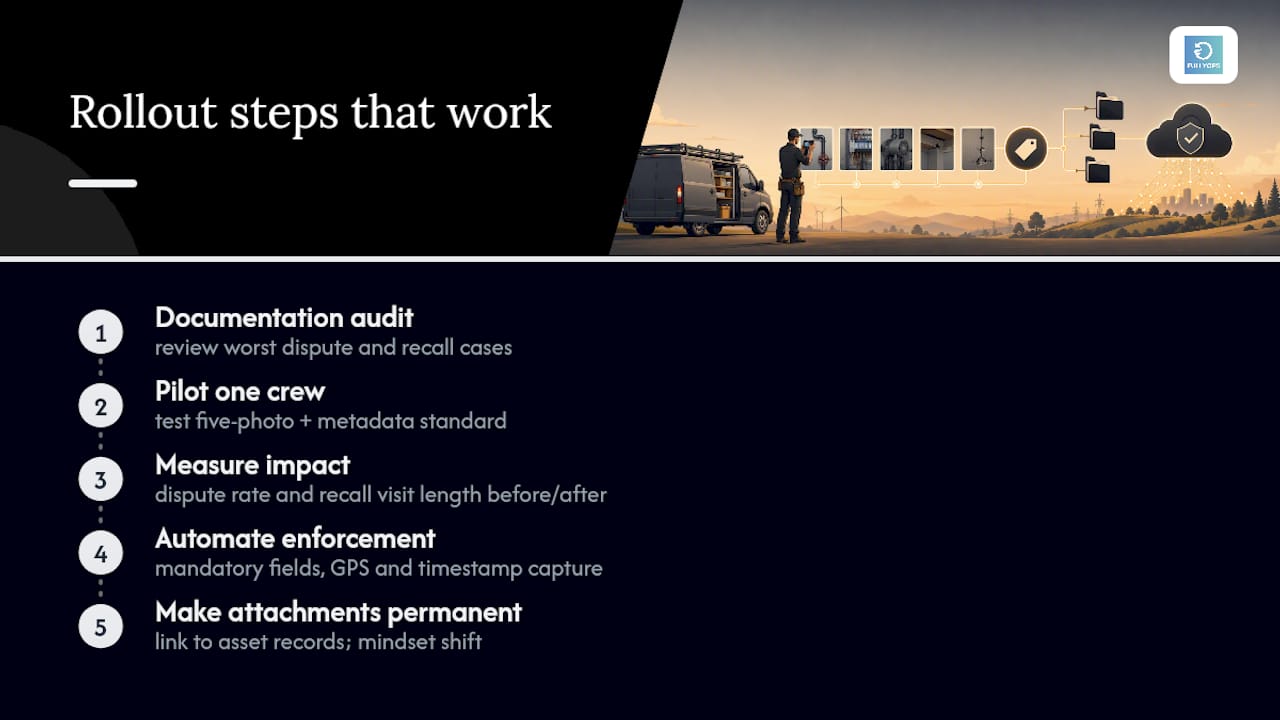
Most operations teams try to mandate attachment policy from the top down and wonder why adoption stalls. Start smaller than that. Begin with a documentation audit of your worst dispute or recall cases from the past quarter and pilot the five-photo and metadata standard with one crew. Measure dispute rate and recall visit length before and after; that comparison is what proves the policy is worth wider rollout, not a memo.
Once the pilot holds up, automate enforcement rather than relying on discipline. Mandatory fields, GPS and timestamp capture, and direct linkage to asset records remove the guesswork technicians would otherwise face on a rushed job. The teams that get this right treat attachments as permanent asset history, not job paperwork, which is the mindset shift that makes the rest of the policy stick.
— Pedro
How Fullyops handles attachment discipline for you
Fullyops is the practical alternative to bolting a document library onto a work-order system after the fact. Mobile photo capture embeds timestamp, GPS and technician ID automatically, attachments link directly to asset records rather than job numbers, and mandatory checkpoints stop a job closing until the required certificate or photo set is present. Job-specific templates mean a safety inspection and a routine service call carry different attachment requirements without anyone having to remember which is which, and built-in reporting surfaces missing documentation before it reaches invoicing rather than after a dispute. If your current setup still relies on personal photo rolls and shared folders, the field service management platform is built to close that gap. Book a demo to see how attachment enforcement runs on a live work order.
PREGUNTAS FRECUENTES
What types of attachments can you add to a work order?
Most field-service platforms support three types: photos or files (PDFs, manuals, certificates), text notes, and URL links to a document library.
How many photos should a technician take per job?
Aim for three to five: context, detail, nameplate, and before/after completed-work shots, following the five-photo discipline that field-service best practice recommends.
Why link attachments to the asset instead of the customer?
Customers change address or ownership, but the asset’s serial number stays constant, so linking attachments to the asset record preserves searchable history across those changes.
Should attachments be stored natively or linked to an external library?
Native storage is simpler for technicians, while linking to a library such as SharePoint gives administrators better version control; many teams use a hybrid of both depending on document type.
What metadata should every work-order attachment include?
Timestamp, GPS coordinates, technician ID, and a serial or nameplate reference are the four fields that make an attachment defensible and searchable later.
Can attachment capture be made mandatory before job closure?
Yes. Platforms like Fullyops let managers set required attachment checkpoints so a technician cannot close a job or submit hours until the mandatory files or photos are uploaded.