

Managing change in maintenance means formally screening, reviewing and approving any modification to equipment, procedures or software before it goes live, so risks get caught before they cause downtime or an incident. The single action to take today: build a short screening checklist into your work-order process so nobody bypasses the CMMS to make a change informally. Everything below gives you the steps, roles, KPIs and templates to run that properly.
En resumen:
- Most changes should pass a quick screening process that takes only minutes and determines if a full MOC review is necessary based on the change’s complexity.
- An effective MOC requires clear ownership, including a designated change owner, manager, and technical approvers for each step, to prevent informal workarounds.
- Embedding MOC checks into existing CMMS workflows, such as linking approvals and updates to work orders, ensures traceability and prevents process breakdowns.
- Delayed or incomplete closures of MOC records, especially those over 90 days, undermine safety and require revalidation or re-assessment to maintain risk control.
- Using role-based access and automatic triggers within a CMMS platform reduces friction, promotes timely updates, and keeps the risk management process auditable.
Índice
- What is gestão da mudança manutenção in practice?
- The six-step MOC process for maintenance teams
- Who owns each MOC decision?
- Embedding MOC into daily maintenance workflows and CMMS
- KPIs and a minimum viable MOC checklist
- Common MOC pitfalls and how to fix them
- A practical note on where MOC actually breaks down
- Reducing MOC friction with a CMMS-first platform
- Sources
- PREGUNTAS FRECUENTES
What is gestão da mudança manutenção in practice?
Management of change (MOC), sometimes referred to by its Portuguese term gestão da mudança manutenção, is a structured process for evaluating, authorising and documenting technical or procedural changes so risks to safety, reliability or quality get caught before implementation, not after. Note this is distinct from organisational change management, which deals with culture and people. Here, we are talking strictly about changes to equipment, maintenance procedures, work orders, schedules and CMMS configuration.
The process matters most where a small oversight has outsized consequences: a substituted valve spec, a modified SOP, a CMMS field that silently changes how a work order gets routed. The IChemE Safety Centre’s MOC guidance frames it as essential in high-hazard industries specifically because unauthorised or poorly managed technical changes are a recurring root cause of incidents. Maintenance teams run into the same failure pattern on a smaller scale constantly: a technician swaps a part “temporarily” and nobody ever closes the loop.
The six-step MOC process for maintenance teams
Every credible MOC framework, including guidance from AIChE/CCPS, collapses into six phases. Skipping any of them is how “quick fixes” turn into permanent, undocumented risk.
- Initiate. Anyone requesting a change, whether it is a new torque spec or a CMMS workflow tweak, logs it with a short description, the reason and the affected asset or process. This should take under five minutes inside your work-order system, not a separate email chain.
- Screen. A trained reviewer decides in minutes whether this is a “like-for-like” replacement (often no full MOC needed) or something that changes function, materials, safety margin or software logic (full MOC required). Most changes should clear screening quickly.
- Review. Technical and risk assessment: what could go wrong, who is affected, what documents need updating. For anything touching safety-critical equipment, involve at least two competent people, as recommended by AIGA’s MOC guidance.
- Approve. Formal sign-off from the change owner and any technical approvers the review flagged. No verbal-only approvals for planned changes.
- Implement. Execute the change, but hold final commissioning until a pre-start-up safety review (PSSR) confirms the equipment or procedure is safe to return to service. PSSR is mandatory for any change that alters safety-critical function, not optional paperwork.
- Capture & close-out. Update every affected document, train the relevant staff, and formally close the record. Closure is not “the change works”; it is “everything is documented and everyone affected knows.”
For temporary or emergency changes, apply a stricter version, not a looser one: require two competent people to agree verbally before acting, then record that approval in writing within 24 to 48 hours. Set a hard expiry date on every temporary change so it cannot quietly become permanent.
Who owns each MOC decision?
Vague ownership is the fastest route to informal workarounds. AIGA’s guidance is explicit that roles can be combined in smaller teams, but they must be assigned, not assumed.
- Change owner: holds final accountability for the change from initiation to closure, including confirming documentation and training are actually complete, not just scheduled.
- Change manager: runs the checklist, verifies screening decisions, chases overdue actions and keeps the MOC register current.
- Technical approvers: sign off on the specific engineering, safety or software risk their discipline covers. A change touching electrical, mechanical and control systems needs approval from each, not a single generalist.
- Initiator: raises the request but does not approve their own change. That separation is what stops normalisation of deviance, where “we’ve always done it this way” quietly overrides the actual review.
Escalate to multi-discipline review whenever a change affects a safety system, alters a process boundary, or repeats a previous temporary fix for the third time. That third repetition is your signal the “temporary” change needs a permanent, fully reviewed solution.
Consejo profesional: Give your change manager authority to reject an approval that lacks a named technical approver. A checklist only works if someone can actually stop an incomplete record moving forward.
Embedding MOC into daily maintenance workflows and CMMS
MOC fails when it lives in a separate binder or a parallel spreadsheet. It works when it is triggered from the same screen a technician already uses to close a work order. AIChE/CCPS guidance makes this point directly: MOC succeeds where it is enforced by role-based checkpoints inside existing workflows, not bolted on as bureaucracy.
Practical integration points inside a CMMS:
- Add an MOC screening flag to work-order and spare-parts substitution templates so a part swap that isn’t like-for-like automatically prompts a screen.
- Link SOP revisions and control-logic changes to the asset record they affect, so anyone opening that asset sees the current, approved version.
- Keep P&IDs, drawings and certificates version-controlled inside the platform rather than in a shared drive, with a timestamp showing who approved which revision.
- Set automated triggers: a notification when an MOC has been open longer than its target window, and a closure reminder tied to training completion, not just implementation.
Master-data hygiene is the quiet blocker here. PEMAC’s Maintenance Management Framework notes that inconsistent asset IDs and shallow hierarchy depth routinely undermine traceability, even when the MOC process itself is sound. A well-run proceso de gestión de órdenes de trabajo with clean asset hierarchies gives your MOC records somewhere reliable to attach to. Without that discipline, you can run a perfect MOC process on paper while your CMMS quietly loses track of which asset version is actually installed.
KPIs and a minimum viable MOC checklist
You cannot manage what you do not measure, and MOC programmes that skip metrics tend to accumulate a backlog nobody notices until an audit or an incident forces the question.
Track these four KPIs monthly:
- Open MOCs, broken down by risk category, so leadership sees volume and severity together, not just a raw count.
- Ageing bands (0 to 30 days, 30 to 90 days, over 90 days) since CCPS guidance treats ageing as a standard measure of programme health.
- SLA for action-item closure, tracking how many post-approval actions (documentation, training) close within their target window.
- PSSR completion rate on changes flagged as requiring one, since a skipped PSSR is a silent gap in your safety net.
A minimum viable MOC record needs just six fields to be usable: scope of the change, a short risk summary, named approvers, the implementation plan, and confirmation that training and documentation updates are complete. Some teams go further and attach a numeric readiness or risk score to each change; academic work on continuity and change-risk scoring shows this kind of scoring makes prioritisation and audit trails more reproducible on larger programmes, though a simple checklist is enough for most maintenance teams starting out.
When presenting these figures to operations leadership, lead with the ageing chart. A rising over-90-day bar is the single number that tells a manager the programme needs attention faster than any narrative summary.
Common MOC pitfalls and how to fix them
The same three failure modes recur across maintenance teams, regardless of industry or CMMS.
Ageing backlog. If implementation slips, the original risk assessment can go stale, and the CCPS guidance is direct about this: delayed MOCs must be revalidated, not just left open. Set a hard age threshold (commonly 90 days) that automatically triggers a revalidation review rather than letting the record sit.
- Review the open-MOC list weekly, not quarterly, at the same meeting where you review overdue work orders.
- Assign an auditor checkpoint every 90 days to sample closed MOCs and confirm the documentation trail actually matches what happened.
- Never let “operational pressure” become an informal justification for closing an MOC before training and documentation updates are finished.
Incomplete closures. En IChemE guidance lists specific documents that must be updated before closure, including operating procedures, control logic, P&IDs and training records. Closure that skips these leaves operations running on outdated information, which is arguably worse than having no MOC process at all, since staff assume the paperwork reflects reality.
Weak PSSR. Treating the pre-start-up review as a formality rather than a genuine verification step is how changes that looked fine on paper cause problems on restart.
Consejo profesional: Build your closure checklist so the “close” button is physically unavailable until training records and document updates are ticked off. Removing the option to skip a step is more reliable than asking people to remember it.
A practical note on where MOC actually breaks down
The gap I keep seeing isn’t in the framework, it’s in the handoff. Teams write a thorough MOC record, get it approved, implement the change, and then the closure step quietly slips because nobody owns updating the SOP or scheduling retraining. That’s not a compliance failure so much as a workflow failure: closure was never wired into anyone’s daily task list.
One maintenance team I’ve seen described anonymously fixed this simply by making documentation and training updates a mandatory field on the work order that triggered the change in the first place, not a separate follow-up task. Open MOCs dropped because there was nowhere for them to hide.
Start with one asset class and a five-field screening checklist. Run it for a month, see where it snags, then expand. A small, auditable pilot beats a comprehensive programme that nobody actually follows.
— Pedro
Reducing MOC friction with a CMMS-first platform
Most MOC breakdowns trace back to one thing: the change record lives apart from the work order, the asset history and the technician doing the job. Some platforms close that gap by keeping screening, approvals and documentation updates inside the same platform teams already use for work orders, inventory and reporting, so a change to an asset’s SOP or spare-parts list is visible right where the technician sees the task, not buried in a separate register.
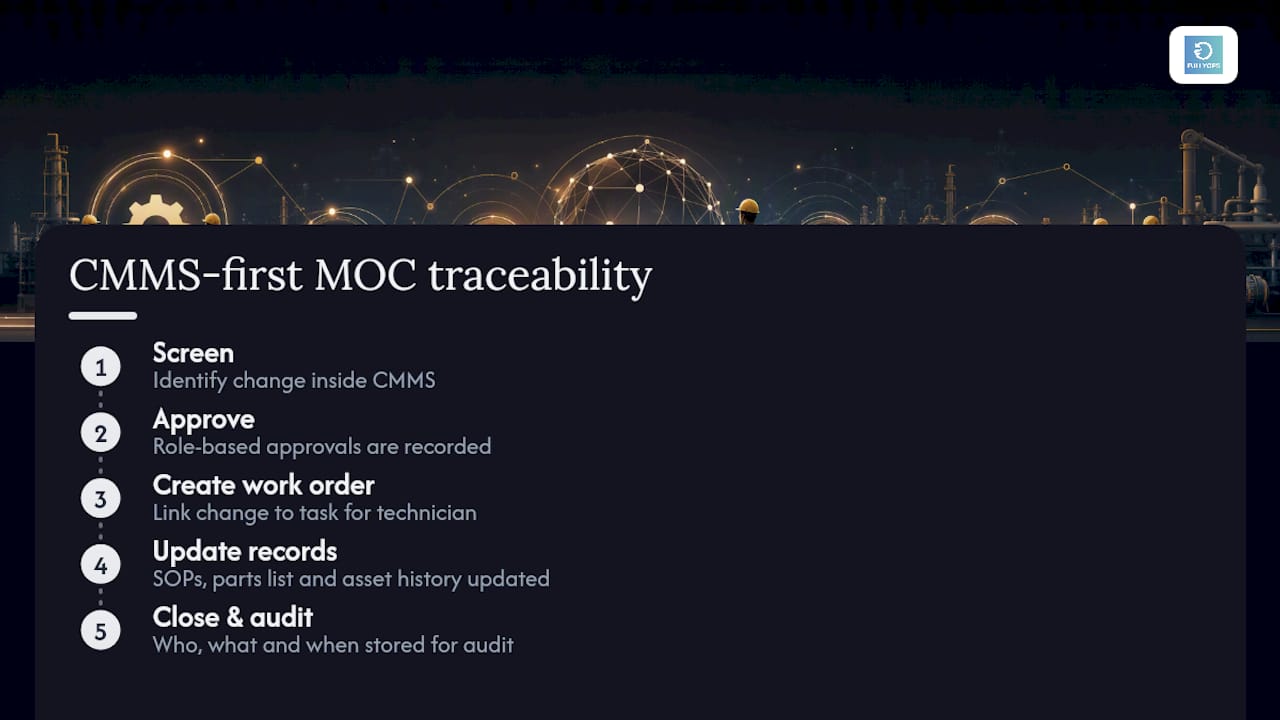
That traceability is what auditors actually check: who approved a change, what got updated, and when. A platform built around work order management and role-based CMMS access makes that trail automatic rather than something you reconstruct after the fact.
None of the checklists or KPIs above require software to work. But if you’re managing MOC across dozens of assets and a growing backlog, a demo of Fullyops’ field service management tools is a practical next step to see how screening and closure fit into your existing maintenance operation.
Sources
- IChemE Safety Centre — Management of Change document and annex v10
- AIGA 010_19 Management of Change final version
PREGUNTAS FRECUENTES
What does gestão da mudança manutenção mean?
It refers to management of change scoped to maintenance and assets: the process of screening, reviewing and approving changes to equipment, procedures or CMMS records before they go live, rather than organisational or cultural change.
What is the difference between a full MOC and a screening?
A screening is a rapid triage, often minutes long, to decide whether a change is like-for-like or requires a full technical and risk review; most changes should clear screening without needing the full process.
Is PSSR always required for a maintenance change?
A pre-start-up safety review is mandatory whenever a change alters safety-critical function or process boundaries; routine like-for-like replacements typically do not require one.
How long can an MOC stay open before it needs revalidation?
Guidance from CCPS treats a delayed implementation as grounds to revalidate the original risk assessment; many teams set a 90 day threshold as a practical trigger.
Can a CMMS handle MOC without separate software?
Yes. Embedding MOC screening into existing work-order templates and asset records, as some platforms support, keeps the process auditable without a standalone system.