

The right approach is role-based CMMS training with a hands-on sandbox and vendor-led user acceptance testing (UAT), rather than a generic software walkthrough. Technicians need mobile work-order practice, planners need scheduling and parts drills, and managers need configuration and KPI dashboards. Shortlist only courses that include a sandbox or UAT session before you commit.
En resumen:
- Role-based CMMS training with hands-on sandbox or UAT sessions ensures practical competence for technicians, planners, and managers before full deployment.
- Vendor-led, environment-specific training produces faster learning, especially when courses include clear assessment criteria like completing work orders within set timeframes.
- Ongoing support, such as refreshers and governance reviews, is vital for sustained adoption, as most failures occur months after initial training.
- A structured 90-day rollout with parallel pilot testing, real data validation, and phased learning significantly reduces configuration gaps and stabilizes system use.
- Covering core tasks early, like work-order execution and scheduling, and maintaining continuous training, improves long-term CMMS adoption and process integration.
Índice
- What types of CMMS training courses exist?
- What should each role learn in a CMMS course?
- How do you choose the right CMMS training provider?
- How do you apply CMMS training during a rollout?
- What does a 90-day CMMS learning path look like?
- How much does CMMS training cost?
- What do successful CMMS training rollouts look like in practice?
- Why ongoing, role-based training beats a one-off course
- Run your CMMS training and pilot on Fullyops
- Sources
- PREGUNTAS FRECUENTES
What types of CMMS training courses exist?
Course formats vary far more than most buyers expect, and the format matters as much as the content. A classroom session suits a small maintenance team that needs a shared reference point and instructor access on day one. Live online training works well for distributed teams across multiple sites, since it keeps the interaction of a classroom without travel costs.
Self-paced courses fit individual technicians who need flexibility around shift patterns, but they rarely include the sandbox practice that makes CMMS training stick. Vendor-led training, delivered directly against your live or sandbox environment, tends to produce the fastest competence because it maps every lesson to your actual asset register and workflows rather than a generic demo.
- Classroom or in-house workshops: best for whole-team rollouts, usually 1 to 3 days, often bundled with a completion certificate.
- Live online sessions: suited to multi-site teams, typically 2 to 6 hours per module spread across several weeks.
- Hybrid programmes: combine a short live briefing with self-paced modules, popular for phased CMMS rollouts.
- Self-paced e-learning: lowest cost, works for individual technicians building fundamentals at their own pace.
- Vendor sandbox training: run against a test environment, essential for UAT and configuration validation.
Certificate programmes aimed at managers often bundle several short sessions covering strategy, planning and predictive maintenance into one structured maintenance management certification, issued on completion of the full sequence.
What should each role learn in a CMMS course?
A syllabus written for “everyone” teaches no one well. Effective programmes are built around distinct professional roles, mixing maintenance theory with hands-on software practice, and they assume a baseline understanding of maintenance workflows before the software layer is introduced, according to research on CMMS training design.
- Technician module: mobile work-order execution, asset tagging and barcode scanning, closing procedures with notes and photos, safety checklists, and time logging against jobs.
- Planner/scheduler module: job planning and prioritisation, linking parts and inventory to work orders, backlog reduction techniques, and building calendar and usage-based preventive maintenance (PM) schedules, as explained in detail at The Build — dependencies in schedules.
- Manager/admin module: system configuration, dashboard and report building, budgeting against maintenance spend, data governance rules, and core KPIs such as MTBF, MTTR and downtime cost.
- Cross-role practical modules: data import and export, asset hierarchy setup, inventory linkage, and reporting logic that ties software fields to real operational decisions.
Stronger courses also connect CMMS use to wider reliability practice, showing how the software feeds predictive maintenance, FMEA and total productive maintenance rather than treating the platform as a standalone tool. A course that skips this link leaves managers able to run reports but unable to explain what those reports should change on the shop floor.
How do you choose the right CMMS training provider?
Course marketing tends to sound identical, so the differences that matter are usually buried in the fine print. Insist on seeing a sample agenda before you pay, and check that role-based modules and a sandbox or UAT component are named explicitly, not implied.
- Ask whether the instructor has hands-on maintenance experience, not just a training background.
- Request a sample agenda with named modules, timings and assessment methods.
- Check what happens after the course ends: refresher sessions, help desks, or governance reviews.
- Confirm the course covers data governance, not just data entry.
Red flags are easy to spot once you know what to look for: a course built entirely around a vendor demo video, a lecture-only format with no exercises, or an assessment that amounts to a satisfaction survey rather than a skills check. None of these produce technicians who can close a work order correctly under time pressure.
Consejo profesional: Ask the provider for one concrete acceptance criterion, such as “a technician can complete and close a PM in under a set number of minutes in the sandbox.” If they cannot give you one, the course probably has no measurable outcome at all.
Continuous training and adoption support matter more than the initial course itself. Industry guidance on CMMS rollouts consistently points to weak ongoing support, not software limitations, as the main reason adoption efforts fail.
How do you apply CMMS training during a rollout?
Training only proves its worth once it meets a live rollout, and the sequencing matters. Skipping the pilot stage is the single most common reason well-trained teams still struggle in the first month after go-live.
- Clean and prepare master data and asset hierarchies before any hands-on training begins, so exercises reflect real assets rather than placeholder records.
- Run a 30–60 day parallel pilot with full UAT before cutting over, validating configuration against real work orders rather than theoretical ones, as recommended for CMMS migration projects.
- Assign each role a short, written standard operating procedure covering their daily CMMS tasks, not a full manual nobody reads.
- Measure adoption directly using suitable KPIs such as PM compliance rate and work-order cycle time during initial post-go-live periods.
- Schedule periodic refresher sessions tied to audit outcomes, rather than treating training as a one-off launch event.
Role-based UAT scripts work best when they mirror real daily tasks. A technician script might require completing a set of typical PM and corrective work orders from start to finish, while a planner script builds a full week’s schedule from an existing backlog, following the approach used in structured CMMS setup training. This kind of scripted UAT reveals configuration gaps that classroom-only training simply never surfaces.
What does a 90-day CMMS learning path look like?
A structured path beats an open-ended “figure it out as you go” approach every time, mainly because it forces training and rollout activities to happen in the right order.
- Weeks 1 to 2: cover core CMMS concepts and role-specific quick wins, such as a technician logging their first mobile work order.
- Weeks 3 to 6: practise in a sandbox, clean up master data, and complete small pilot tasks like tagging a single equipment line.
- Weeks 7 to 10: run a parallel live pilot with UAT, adjusting configuration based on what planners and technicians actually flag.
- Weeks 11 to 12: support the full go-live, set baseline KPIs from the pilot data, and lock in a recurring refresher schedule.
Consejo profesional: Treat weeks 7 to 10 as the real test of training quality. If technicians still hesitate over basic work-order steps by that point, the course itself needs revisiting, not just the rollout plan.
Teams already using a platform like Fullyops can lean on its work-order and reporting features during the sandbox and pilot phases, since exercises built against a familiar interface transfer more directly to daily use than generic vendor screenshots.
How much does CMMS training cost?
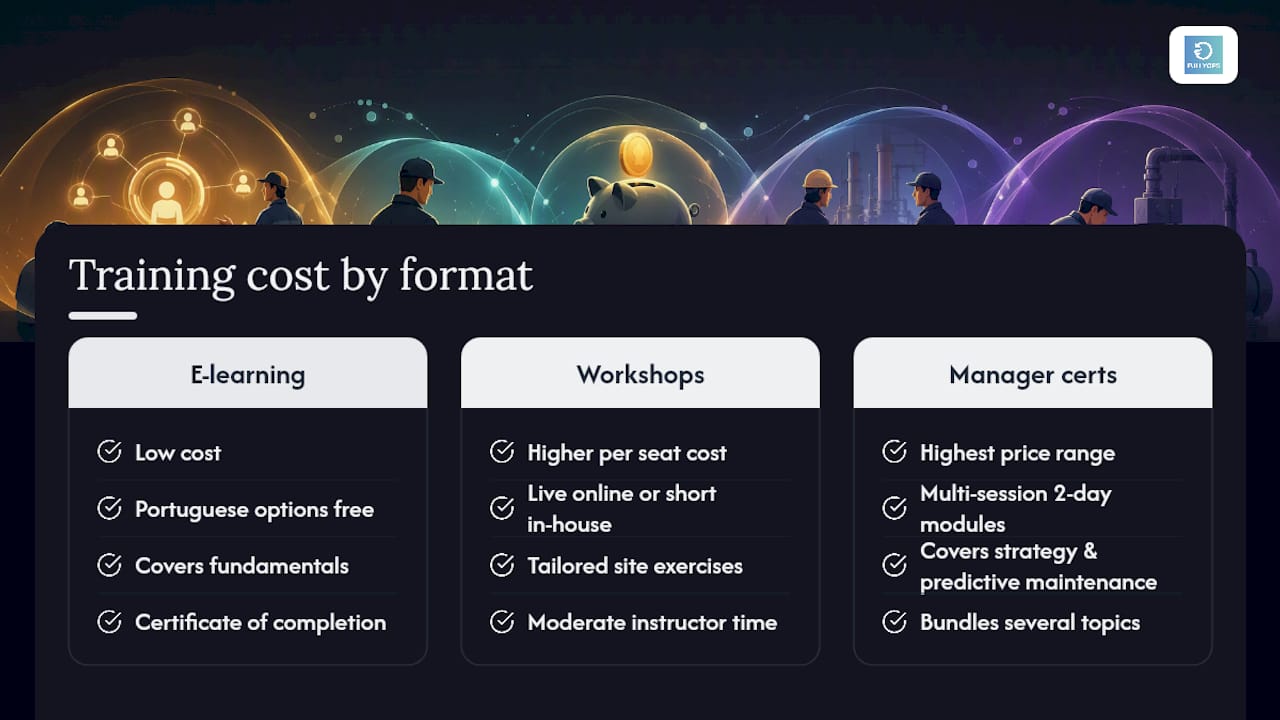
Prices swing widely depending on format and depth, which makes side-by-side comparisons harder than they should be. Self-paced e-learning sits at the lower end, and some Portuguese-language options are free, covering fundamentals such as asset registers, preventive maintenance basics, inventory and reporting, with a certificate of completion included.
Live online modules and short in-house workshops typically cost more per seat, reflecting instructor time and the ability to tailor exercises to a specific site’s asset base. Multi-session manager certificate programmes, built around 2-day modules covering strategy, planning and predictive maintenance, sit at the top of the price range because they bundle several distinct topics into one credentialed sequence rather than a single afternoon session.
Vendor sandbox training and UAT support usually carry a separate cost or are bundled into implementation packages, since they involve configuring a test environment against your own data rather than a shared demo. Certification itself, where offered, is rarely the expensive part. The real cost driver is the number of contact hours with an instructor and the depth of hands-on practice built into the agenda. A course promising a low headline price but no sandbox component is often more expensive in the long run, since teams end up learning correct procedures on the live system through trial and error.
What do successful CMMS training rollouts look like in practice?
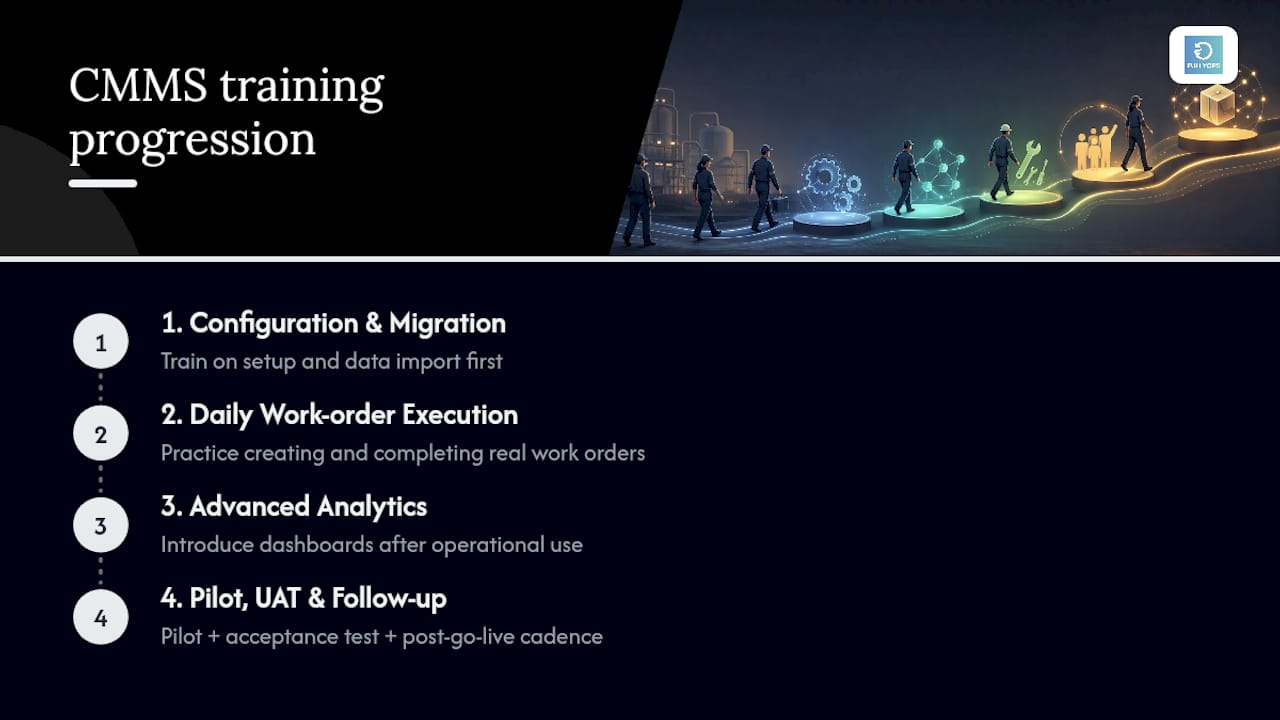
The pattern behind successful rollouts is consistent: training is sequenced to match the maintenance lifecycle rather than delivered as one dense session. Courses that follow configuration and data migration first, then daily work-order execution, then advanced analytics, give teams a natural on-ramp instead of overwhelming them with dashboard features before they have logged a single work order, a structure recommended in CMMS setup and utilization training.
Teams that pair this sequencing with a parallel pilot report fewer configuration surprises at go-live, because UAT catches mismatches between the training environment and real operational data before they become live incidents. A planner who has already built a week’s schedule from backlog items during UAT arrives at go-live having already solved the exact problem they will face on day one.
The common thread across these examples is not the software vendor or the course length. It is the presence of a pilot, a measurable acceptance test, and a follow-up cadence that stops training from ending the moment the certificate is issued. Teams that skip straight from classroom training to full cutover consistently report a longer stabilisation period, simply because nobody has stress-tested the configuration against real work before the rest of the organisation depends on it.
Why ongoing, role-based training beats a one-off course
Most teams treat CMMS training as an event: a course, a certificate, done. That framing misses the actual failure point. Adoption breaks down months after go-live, when refresher support has quietly stopped and new hires get a five-minute walkthrough instead of the role-based grounding everyone else received.
The teams that get real value from a CMMS are the ones who treat training as a recurring line item, not a launch cost. That means quarterly refreshers, audit-linked coaching, and a sandbox that stays available long after go-live, not just during it. Fullyops sees this pattern repeatedly across rollouts: platforms with strong pilot and sandbox support tend to retain adoption gains far better than those where training stopped the day the system went live.
— Pedro
Run your CMMS training and pilot on Fullyops
Fullyops gives maintenance teams a working environment to practise on, not just a slide deck. Work-order management, preventive maintenance scheduling and built-in performance analytics let technicians, planners and managers rehearse real scenarios, such as closing a mobile work order or reading a downtime dashboard, before those actions carry live consequences. That matters most during the parallel pilot and UAT phase, where a platform built for structured work-order management turns a training exercise into a genuine adoption test.
If your team is planning a CMMS rollout, the practical next step is to request a guided pilot and see how resource allocation and asset management map onto your own asset register before committing to a full cutover.
Sources
- Computerized Maintenance Management System (CMMS) – Corporate & Industrial Training Center
- CMMS setup and utilization | Interdisciplinary Professional Programs
- Maintenance Management Certification (MMC) | Professional and Distance Education Programs
- Treinamento de Manutenção CMMS Gratuito – Certificado
PREGUNTAS FRECUENTES
What is the best format for formação em CMMS?
Role-based training combined with a hands-on sandbox or vendor-led UAT delivers the strongest results, since it maps every lesson to real work orders and asset data rather than generic screenshots.
How long does CMMS training usually take?
In-house workshops run 1 to 3 days, live online modules span several weeks in short sessions, and a full 90-day path covering sandbox practice, pilot and go-live support gives the most complete grounding.
Do CMMS training courses lead to certification?
Many manager-level programmes issue a certificate on completion of a multi-session sequence, while technician-focused and free courses more commonly offer a certificate of completion rather than a formal credential.
What is the biggest reason CMMS training fails to stick?
Weak ongoing support after the initial course, not the software itself, is consistently cited as the main cause of poor adoption, which is why refresher sessions and governance reviews matter as much as the original training.
Can Fullyops support CMMS training and pilots?
Some platforms provide work-order management, scheduling and analytics that teams can use during sandbox practice and parallel pilots, giving technicians, planners and managers a realistic environment to test procedures before full rollout.
Recomendado
- Software de mantenimiento basado en la nube: 60% de eficiencia y 25% menos de tiempo de inactividad
- El papel de la GMAO en el mantenimiento: impulsar un tiempo de actividad proactivo
- 30–60 Day Parallel Run for CMMS Migration, Pilot First for Maintenance
- Flujo de trabajo para el mantenimiento preventivo: Reducir costes en 30% en 2026