

TL;DR:
- Inefficient service workflows significantly increase costs and extend repair times.
- A structured, digital process with clear roles reduces failed visits and improves asset reliability.
- Continuous measurement and team engagement are essential for sustaining workflow improvements.
Failed service visits can account for up to 25% of service costs, yet many organisations continue to treat their service request workflow as a secondary concern. The performance gap between top and bottom-tier field service organisations is substantial, with leading teams outperforming their peers by 28% across key operational measures. For operational managers, this is not an abstract statistic. It translates directly into wasted technician hours, inflated repair costs, and deteriorating asset reliability. This guide walks through how to design, implement, and verify a service request workflow that reduces downtime, improves resource allocation, and builds measurable team accountability at every stage.
Table des matières
- Understanding the service request workflow: Components and significance
- Preparation: Laying the groundwork for workflow success
- Executing an efficient service request workflow: Step-by-step approach
- Verifying results and iterating for continuous improvement
- Why conventional workflow fixes miss the mark—and what really drives results
- Take your service request workflow to the next level with FullyOps
- Questions fréquemment posées
Principaux enseignements
| Point | Détails |
|---|---|
| Workflow efficiency drives ROI | A streamlined service request workflow sharply reduces costs and resource waste across operations. |
| Fail-safes prevent costly errors | Clear intake procedures and robust knowledge sharing minimise failed visits and repeat repairs. |
| Continuous improvement matters | Tracking critical metrics and making incremental improvements sustain high performance. |
| Technology accelerates results | Digitisation and automation multiply manager effectiveness in handling service requests. |
Understanding the service request workflow: Components and significance
A service request workflow is the structured sequence of actions that transforms an incoming maintenance or repair request into a completed, documented intervention. It covers five core stages: initiation, where the request is raised and captured; assignment, where the right technician is identified and dispatched; execution, where the work is carried out on site; documentation, where outcomes are recorded; and review, where performance is assessed and lessons are captured. Each stage involves distinct roles, from the requester who raises the fault, to the dispatcher who routes it, to the technician who resolves it, and the manager who oversees quality and compliance.
Understanding who does what at each stage is essential for identifying where delays and errors originate. The table below summarises the typical inputs and outputs at each workflow stage.
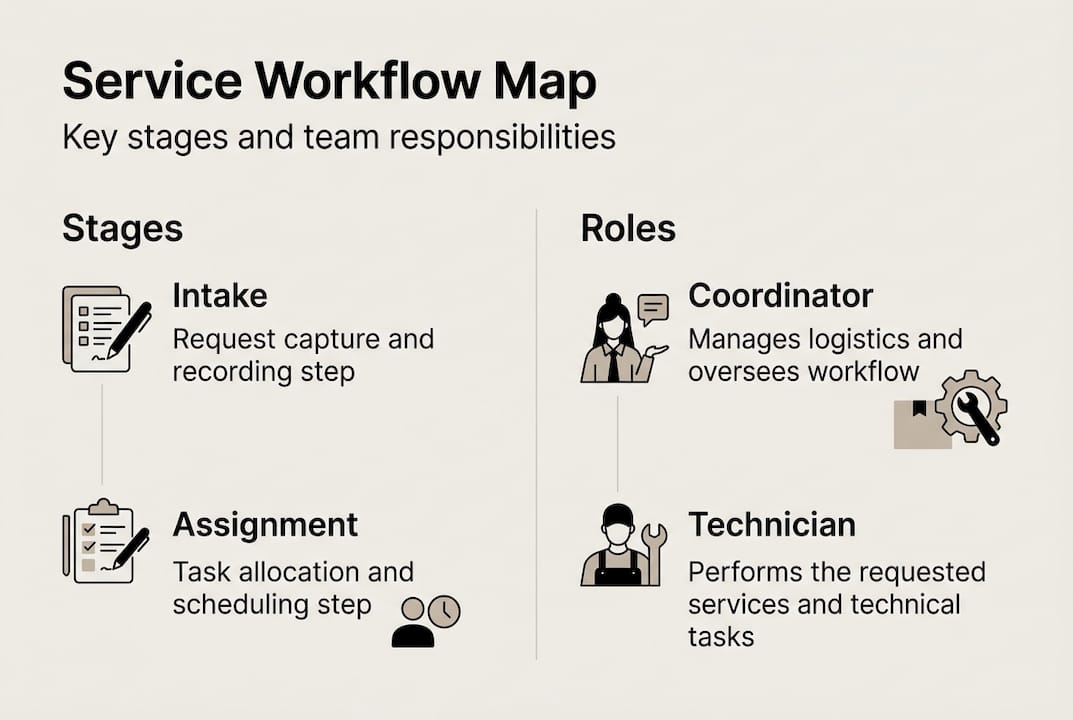
| Stage | Key roles | Inputs | Outputs |
|---|---|---|---|
| Initiation | Requester, dispatcher | Fault description, asset ID | Logged service request |
| Assignment | Dispatcher, manager | Technician availability, skill set | Dispatched work order |
| Execution | Technicien | Work order, parts, knowledge base | Completed repair, field notes |
| Documentation | Technician, manager | Field notes, photos, time logs | Closed work order, records |
| Révision | Manager | Completed records, KPI data | Performance report, process updates |
The failure to streamline workflows directly increases costs and extends Mean Time to Repair (MTTR), making every inefficiency a measurable liability. A well-structured service management checklist helps managers confirm each stage is properly governed before moving to the next. Optimising the workflow delivers benefits across multiple dimensions:
- Reduced MTTR: Faster triage and dispatch shrink the time between fault and fix.
- Better resource utilisation: Clear assignment rules prevent technician idle time and double-booking.
- Satisfaction accrue des clients: Reliable, first-visit resolutions build confidence with internal and external clients.
- Regulatory compliance: Documented workflows create an audit trail for maintenance obligations.
- Lower operational costs: Fewer repeat visits and failed calls reduce cost per intervention.
Understanding the advantages of field service software becomes far more practical once you can map those advantages to specific workflow stages. Even a basic booking appliance service process demonstrates how structured intake reduces errors from the very first step.
Preparation: Laying the groundwork for workflow success
Understanding the workflow’s stages, preparation ensures every request sets the stage for a swift, effective response. Before any request enters your system, the infrastructure to capture, categorise, and route it must already be in place. Rushing this phase is one of the most common reasons workflow projects fail to deliver lasting improvements.
The essential prerequisites for a well-prepared workflow include:
- A standardised service request form that captures asset ID, fault description, location, and urgency level.
- A digital submission channel accessible to all requesters, whether via mobile app, web portal, or integrated CMMS.
- A clear issue categorisation system that groups faults by type, asset class, and required skill set.
- A priority matrix that assigns urgency levels based on operational impact, safety risk, and asset criticality.
The comparison below illustrates why digital intake consistently outperforms manual processes across the metrics that matter most.
| Intake method | Speed | Data quality | Traceability | Error rate |
|---|---|---|---|---|
| Digital (automated) | Haut | Consistent | Full audit trail | Faible |
| Manual (paper/phone) | Faible | Variable | Partial or none | Haut |
A robust knowledge base is equally critical. Technicians who arrive on site with access to quick-reference guides, historical repair records, and asset-specific documentation resolve faults faster and with fewer return visits. Top performers achieve 88% first-time fix rates, and documentation and knowledge-sharing processes underpin this result. Investing in structuring your service teams around clear knowledge-transfer protocols pays dividends long before the first request is submitted.

Pro Tip: Automate information capture at the point of submission. Pre-filled asset data, mandatory fields, and dropdown categorisation eliminate the error-prone manual entry that causes downstream delays in dispatch and execution.
Efficace scheduling technician deployment also depends on the quality of data captured at intake. Poor intake data leads to mismatched assignments, wasted travel, and avoidable repeat visits. Addressing technician knowledge loss proactively, rather than reactively, is what separates prepared organisations from those constantly firefighting. The value of certified technicians is also amplified when they are supported by well-structured intake and knowledge systems.
Executing an efficient service request workflow: Step-by-step approach
Once you have preparations in place, here is how to ensure every request flows smoothly from start to finish. A clearly defined execution sequence removes ambiguity, reduces handoff errors, and keeps accountability visible at every stage.
- Request intake: Receive and log the service request through your digital channel, confirming all mandatory fields are complete before the record is accepted.
- Triage: Categorise the request by fault type and priority level, cross-referencing the priority matrix to determine urgency and required skill set.
- Dispatch: Assign the most suitable available technician based on skill, location, and current workload, then communicate the work order with full asset and fault context.
- Execution: The technician carries out the repair or maintenance task on site, referencing knowledge base resources as needed.
- Field completion: The technician closes the work order on site, capturing time, parts used, photos, and outcome notes via a mobile tool.
- Feedback and review: The manager reviews the closed work order, validates data quality, and flags any anomalies for process review.
The table below maps each step to its responsible role and highlights common pitfalls to avoid.
| Étape | Responsible role | Common pitfall |
|---|---|---|
| Request intake | Requester, dispatcher | Incomplete or inaccurate fault data |
| Triage | Dispatcher, manager | Misclassified priority leading to delayed response |
| Dispatch | Dispatcher | Assigning technicians without matching skill set |
| Execution | Technicien | Proceeding without full asset context |
| Field completion | Technicien | Delayed or incomplete data capture after the visit |
| Feedback and review | Manager | Skipping review cycles under time pressure |
Critical: Reducing failed visits and minimising repeat site calls is one of the highest-impact levers for immediate cost savings. A single failed visit does not just cost the direct labour and travel expense. It delays resolution, damages confidence, and often triggers a second call with the same or greater cost.
Pro Tip: Leverage mobile reporting tools to capture data in the field instantly. Technicians who log outcomes at the point of completion produce more accurate records and eliminate the data loss that occurs when notes are written up hours later. Focusing on boosting service team efficiency through real-time data capture is one of the fastest routes to profitability in field services. Organisations that have reduced appliance downtime consistently cite faster field data capture as a key contributing factor.
Verifying results and iterating for continuous improvement
Executing a workflow is only half the battle. Mastery requires consistent measurement and iteration to make improvements stick and ROI tangible. Without a structured review cycle, even well-designed workflows drift over time as teams revert to informal habits and new inefficiencies accumulate.
The three metrics every operational manager should track are:
- First-Time Fix Rate (FTFR): The percentage of service visits resolved on the first call, without requiring a return visit or additional parts order.
- Mean Time to Repair (MTTR): The average elapsed time from request submission to confirmed resolution, including travel and administrative closure.
- Failed visit rate: The proportion of scheduled visits that do not result in a completed repair, due to missing parts, incorrect diagnosis, or access issues.
If your workflow needs improvement, the warning signs are usually consistent and recognisable:
- Delayed handoffs between triage and dispatch, often caused by unclear ownership or manual routing.
- Data loss between field completion and system records, typically from paper-based or offline processes.
- Repeat visits for the same fault, indicating inadequate root cause diagnosis or parts availability.
- Technician idle time, suggesting poor scheduling or misaligned skill-to-task matching.
- Manager review cycles being skipped under operational pressure, leaving process gaps unaddressed.
Key statistic: Companies have saved up to 26% in service costs simply by closing knowledge and process gaps. That figure is not achieved through a single technology purchase. It results from sustained attention to the feedback loops that surface problems early and allow targeted adjustments. Tracking field service gains over rolling monthly periods gives managers the data needed to distinguish genuine improvement from short-term variation. Short review cycles, whether weekly or fortnightly, keep teams aligned and prevent small inefficiencies from compounding into costly operational failures.
Why conventional workflow fixes miss the mark—and what really drives results
Most workflow improvement projects stall not because the process design is flawed, but because the human and cultural dimensions are underestimated. Organisations invest in new software platforms or adopt standardised templates, then find that adoption is patchy and results are disappointing. The technology is rarely the problem.
What top-performing teams do differently is build processes that are easily taught, consistently tracked, and genuinely understood by everyone involved. This means investing in technician onboarding that explains the reasoning behind each workflow step, not just the mechanics. It means creating micro-feedback loops where technicians and dispatchers flag friction points in real time, rather than waiting for quarterly reviews. Addressing preventing knowledge attrition is not a one-off project. It is an ongoing operational discipline.
The uncomfortable reality is that even a well-designed workflow will underperform if teams do not understand why each step matters. When technicians know that incomplete field notes cause repeat visits and erode customer trust, compliance improves without enforcement. Process ownership, not process documentation, is what drives lasting results.
Take your service request workflow to the next level with FullyOps
Now that you recognise what truly drives workflow efficiency, FullyOps provides the tools to turn these principles into measurable operational improvements. The platform supports end-to-end workflow management, from digital request intake and automated triage through to real-time field reporting and performance analytics. Managers can explore the preventive maintenance workflow guide to see how structured scheduling reduces reactive costs, or use the tutoriel sur l'allocation des ressources to optimise technician deployment. For organisations managing complex equipment portfolios, the gestion du cycle de vie des actifs module provides the visibility needed to align service requests with long-term asset strategy and compliance requirements.
Questions fréquemment posées
What is a service request workflow in field service management?
A service request workflow is a structured process for capturing, triaging, assigning, executing, and reviewing maintenance or repair tasks to ensure fast, traceable, and efficient completion.
How does optimising the workflow reduce service costs?
Streamlining your workflow cuts failed visits, lowers average repair times, and can unlock up to 26% savings in service costs according to industry benchmarks.
What are common reasons for failed service visits?
Frequent causes include incomplete request data, poor scheduling, or insufficient technician knowledge, all of which a well-structured workflow directly addresses.
Which metrics should managers track after implementation?
The key metrics to monitor are First-Time Fix Rate (FTFR), Mean Time to Repair (MTTR), and the rate of failed or repeat visits.
Recommandé
- Gestion des services sur le terrain : Optimiser et augmenter l'efficacité - FullyOps
- 4 conseils pour augmenter la rentabilité des services sur le terrain - FullyOps
- SaaS benefits for field teams: efficiency and savings