

TL;DR:
- Every maintenance or service order must include mandatory documentation such as unique ID, timestamps, and signed approvals. Accurate real-time evidence, full audit trails, and proper retention are essential for audit readiness and dispute resolution. Fullyops automates compliance by enforcing data entry, capturing evidence, and generating exportable reports.
Every maintenance or service order must contain a short, mandatory documentation set that proves what was requested, who did the work, when it happened, and what changed. Without it, you face failed audits, unresolved disputes, and insurance claims that go nowhere.
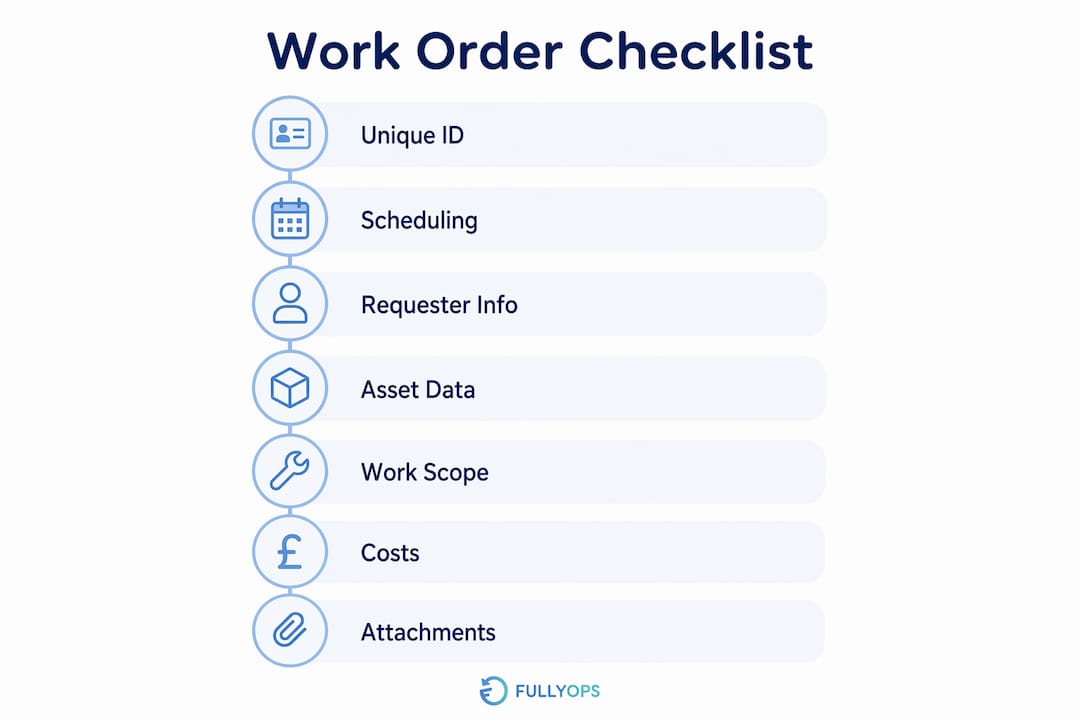
TL;DR checklist — minimum required on every order:
- Unique order number and current status flag
- Requester details and responsible technician
- Asset tag, serial number, and location hierarchy
- Issue date, planned and actual start/finish times
- Description of work and acceptance criteria
- Parts and materials used, with quantities
- Labour recorded per technician (estimated vs actual)
- Signed approvals at each lifecycle stage
- Photographic before/after evidence attached
- Timestamped audit trail of every change
- Exportable audit report ready for insurers or auditors
Three trust signals to capture without exception: a timestamped audit trail that logs every change, photographic before/after evidence attached to the record, and signed approvals at each stage with full approval history retained.
Table of Contents
- What every order record must contain: a field-by-field checklist
- How to record documentation in practice: from creation to close
- Digital versus paper: which approach suits your UK operations?
- Common documentation mistakes that create operational and legal risk
- UK compliance, retention requirements, and audit readiness
- How Fullyops implements these documentation best practices in the field
- Key takeaways
- Why documentation culture matters more than documentation tools
- Fullyops gives your team the documentation infrastructure to pass any audit
- Useful sources and further reading
- FAQ
What every order record must contain: a field-by-field checklist
Standard order documentation must include a unique identifier, dates, descriptions, client and provider details, and responsible signatures. Omitting any of these increases operational risk and complicates dispute resolution.
Identifier and status fields
Every order needs a unique order number assigned at creation, not retrospectively. Alongside it, a status flag distinguishes lifecycle stages such as entered, in progress, awaiting approval, and finalised. Failure to distinguish document status is a common pitfall; every lifecycle stage should be timestamped and linked to that unique identifier to ensure auditability. Version history must be retained so that original records are never overwritten.

Scheduling and timestamp fields
Capture issue date, planned start and finish, actual start and finish, and time recorded per technician. These fields are the backbone of any dispute resolution process. Accurate timestamps also let you measure schedule adherence and identify recurring delays at specific asset types.
Requester and stakeholder details
Record the client or internal requester, the on-site contact, and the responsible technician or contractor. For contracted work, include the contractor’s company name and registration number. This is particularly relevant under UK procurement frameworks, where traceability of responsibility is expected by auditors.
Asset and location fields
Include the asset tag, serial number, and BOM items in the order record, and ensure ERP or field service management (FSM) references match those identifiers to avoid reconciliation failures. Location hierarchy should follow a site > building > room > asset structure so records are searchable by any level.
Work scope and acceptance criteria
A concise description of the work to be performed, the success criteria, any permitted deviations, and health and safety notes (required personal protective equipment, risk level) must all appear before work starts. Acceptance criteria are especially important for work order management because they define when a job is genuinely complete, not just when the technician has left site.
Costs and resources
Record estimated costs, parts and materials with quantities, and labour estimates. Capture actuals separately so variance is visible. Any approvals for out-of-scope work must be documented with the approver’s name, timestamp, and method of authorisation.
Attachments and evidence
Photographs (before and after), test certificates, permits to work, calibration labels, delivery notes, and invoices all belong as attachments on the order record. Label each file with a consistent naming convention: [OrderID]_[AssetTag]_[Type]_[Date] keeps attachments discoverable months later.

Signatures and approvals
Define who must sign or approve at each stage: requester sign-off at creation, technician sign-off at completion, and supervisor or client countersignature at close. Electronic signatures are acceptable in the UK provided they meet the requirements of the Electronic Communications Act 2000 and are captured with a timestamp and audit log.
Pro Tip: Before closing any order, run a single completeness check: unique ID present, actual times recorded, at least one photo attached, and all required signatures captured. If any field is missing, the record stays open.
How to record documentation in practice: from creation to close
A consistent process is what separates teams that pass audits from those that scramble to reconstruct records after the fact. Automating service requests at the point of creation removes the most common source of missing fields.
-
Create the order with mandatory meta and requester fields before any work starts. Assign the unique order number, set the status to “entered,” record the requester and asset details, and attach any pre-work checklists or permits. No technician should travel to site without a properly opened order.
-
Record planned resources, risk controls, and required permits. Confirm parts availability, note required PPE and risk level, and attach any method statements or permits to work. This step protects both the technician and the organisation if a safety incident occurs.
-
Capture evidence during execution in real time. Timestamps, technician notes, photographs, and materials used must be recorded as the work happens, not reconstructed afterwards. Timeliness often matters more than completeness: sending a service report after the fact creates operational friction and increases dispute exposure.
-
Run the approval and sign-off workflow. The technician signs off on completion; the supervisor or client countersigns. Capture electronic signatures with timestamps. If a countersignature cannot be obtained on site, record the reason and set a follow-up task with a deadline.
-
Finalise the record, lock or version it, and export the audit report. Once all fields are complete and signatures captured, change the status to “finalised.” Lock the record against further edits, retain the original version, and export or archive the audit report as required by your retention policy.
For dispute resolution, retain originals and full version history. A record that shows every edit, who made it, and when is far more credible to an insurer or auditor than a clean final document with no history.
Pro Tip: Require field teams to capture the minimum in real time: one photo, a short note, and start/stop timestamps. Managers can enrich the record with fuller reports within a defined service-level window within a short period.
Digital versus paper: which approach suits your UK operations?
Paper forms are still common in facilities management and industrial maintenance, but they carry real costs: illegible handwriting, lost sheets, and no automatic timestamp. A hybrid approach (paper form scanned and uploaded) improves retrievability but still relies on manual data entry and introduces transcription errors. Fully digital mobile capture with offline sync is the most reliable option for field teams, provided the platform handles poor connectivity gracefully.
| Capture mode | Reliability | Speed | Auditability | Integration ease | Common errors |
|---|---|---|---|---|---|
| Paper | Low | Slow | Poor | Manual re-entry required | Illegible data, lost records |
| Hybrid (paper + scan) | Medium | Medium | Moderate | Semi-manual | Transcription errors, scan quality |
| Mobile digital (offline sync) | High | Fast | Strong | API/ERP-ready | Sync conflicts if not managed |
Process documentation is a living asset: automation and workflow management reduce human error and create a single source of truth for teams. For digital implementations, the essentials are: mobile photo capture with GPS or location stamp, e-signatures, offline mode with automatic sync on reconnection, and automatic timestamps on every field change.
For integrations, map order fields to your ERP or finance system so that materials and costs flow through without re-keying. Where relevant, send acknowledgements and advance ship notices promptly to maintain supply-chain transparency. Keep an exportable audit trail that can be sent to auditors or insurers without manual preparation.
Storage and naming conventions matter. Use a consistent file-naming structure for all attachments, store them against the order record rather than in a separate folder, and apply version control so that superseded documents are retained but clearly marked. A searchable archive with date-range and asset-tag filters saves significant time during audits.
Pro Tip: For field teams, prioritise three features above all others: offline sync that works reliably on poor mobile signals, simple photo capture that preserves EXIF metadata (date, time, GPS), and a template that requires the minimum fields before submission.
Common documentation mistakes that create operational and legal risk
The most frequent gaps in maintenance and service order records are predictable, and each carries a specific consequence.
- Missing unique ID: Without a unique identifier, records cannot be reliably linked to assets, invoices, or audit trails. Reconciliation failures follow, particularly when ERP and FSM systems hold separate records.
- Absent or inaccurate timestamps: A record with no start/finish time cannot prove when work occurred. This is the most common reason insurers reject maintenance-related claims.
- No photographic evidence: Without before/after photos, there is no objective proof of asset condition at the time of the intervention. Disputes about pre-existing damage become unresolvable.
- Unsigned or incomplete approvals: An order closed without the required signatures is not a finalised record. It cannot be used as evidence in a chargeback dispute or regulatory inspection.
- Unclear scope or acceptance criteria: When the order does not define what “done” looks like, technicians and clients disagree on completion. This is a leading cause of repeat visits and rework costs.
Accurate order documentation is a primary defence against financial loss; detailed transaction lifecycles with timestamps and approval history materially improve the chance of disputing chargebacks. Corrective actions are straightforward: enforce mandatory fields at creation, require real-time photo capture, run daily close checks to catch unsigned records, and conduct spot audits on a sample of closed orders each week.
Pro Tip: Run a five-minute weekly review: pull the last ten closed orders and check for missing photos, unsigned approvals, and absent timestamps. Three consecutive clean reviews is a reliable signal that your team’s habits have changed.
UK compliance, retention requirements, and audit readiness
Operations managers in the UK must apply specific considerations to documentation retention, audit evidence, and data protection obligations.
Minimum evidence expected by auditors and insurers:
- Timestamped activity log showing every status change
- Signed approvals with approval history retained
- Photographic evidence attached to the order record
- Retained originals where the record has been amended
- Exportable audit report covering the full order lifecycle
Retention guidance: For general maintenance records, a minimum of six years is a common operational benchmark aligned with the UK Limitation Act 1980, which sets the standard limitation period for contract claims. Safety-critical work records, particularly those involving pressure systems, electrical installations, or lifting equipment, may require longer retention under sector-specific regulations. Financial evidence (invoices, delivery notes) should be retained for at least six years to satisfy HMRC requirements. These are operational guidelines; consult your legal or compliance team for requirements specific to your sector and asset types.
GDPR and personal data: Photographs taken during maintenance work can inadvertently capture personal data, particularly in occupied buildings. Avoid capturing identifiable individuals in photos unless strictly necessary, and apply access controls so that order records containing personal data are accessible only to authorised personnel. For subject access requests, ensure your system can export a clean record of all data held against a named individual without exposing unrelated order records. The UK Information Commissioner’s Office (ICO) provides practical guidance on data minimisation and retention that applies directly to maintenance record systems.
Audit readiness checklist:
- Exportable audit report available for every closed order
- Version history retained with timestamps and editor identity
- Attachments stored against the order record, not in a separate system
- Chain of custody documented for safety-critical records
- Access log showing who viewed or exported sensitive records
For sector-specific regulatory guidance, the Health and Safety Executive (HSE) publishes requirements for maintenance records in regulated industries, and the ICO’s accountability framework covers data retention and access controls.
How Fullyops implements these documentation best practices in the field
A modern work-order SaaS platform removes the manual effort from documentation compliance by enforcing the checklist at the point of data entry. Fullyops is built around exactly this principle: mandatory fields prevent orders from being created or closed without the required information, and the platform’s asset maintenance workflow guides technicians through each documentation step in sequence.
Key platform features that directly address the checklist:
- Mandatory fields: Configured per order type so that unique ID, asset tag, requester, and scope are required before an order can be submitted.
- Mobile photo capture: Technicians attach before/after photos directly from a mobile device; EXIF metadata (timestamp, GPS) is preserved automatically.
- Electronic signatures: Captured in the app with a timestamp and stored against the order record, meeting UK electronic signature requirements.
- Offline sync: Orders and attachments are captured without connectivity and synced automatically when the device reconnects.
- Audit trail: Every field change is logged with the editor’s identity and a timestamp; the full history is retained and exportable.
- Exportable reports: Audit-ready reports can be generated and exported for insurers, auditors, or finance teams without manual preparation.
Integrations connect work orders to ERP and finance systems so that materials, costs, and labour flow through without re-keying. This synchronisation between digital records and physical operations is a key differentiator for accurate, on-time fulfilment. Operations analytics built into the platform let managers track documentation compliance rates, identify teams with recurring gaps, and measure the impact of template changes over time.
Phased adoption works best: pilot Fullyops with one team, measure documentation compliance against your mandatory-field checklist after four weeks, iterate the templates based on what technicians flag as friction, then roll out to wider teams with the refined configuration. This approach reduces resistance and produces a template set that reflects real field conditions rather than a theoretical ideal.
Key takeaways
Reliable documentation in work orders requires mandatory fields enforced at creation, real-time evidence capture, signed approvals at every lifecycle stage, and an exportable audit trail retained for at least six years.
| Point | Details |
|---|---|
| Enforce mandatory fields | Unique ID, asset tag, timestamps, and requester details must be required before an order can be submitted or closed. |
| Capture evidence in real time | Photos, timestamps, and technician notes recorded during the job are far more defensible than records reconstructed afterwards. |
| Retain originals and version history | Every edit must be logged with editor identity and timestamp; original records must never be overwritten. |
| Apply UK retention guidance | Maintain maintenance records for a minimum of six years; safety-critical and financial records may require longer under sector regulations. |
| Use Fullyops for end-to-end compliance | Fullyops enforces mandatory fields, mobile capture, e-signatures, audit trails, and ERP integrations in a single platform. |
Why documentation culture matters more than documentation tools
There is a tendency in operations management to treat documentation as a technology problem: buy the right software, configure the right fields, and compliance follows. The reality is more nuanced. The teams that consistently produce audit-ready records are not necessarily the ones with the most sophisticated platforms. They are those where documentation is treated as part of the job, not a box to tick after the job is done.
The shift that actually changes behaviour is making documentation the path of least resistance. When a technician has to fight a clunky interface to attach a photo, they will skip it. When the system requires the photo before the order can be closed, they will take it. That is not a cultural change; it is a design choice. But the cultural change comes when managers review records regularly, acknowledge good practice, and treat a missing timestamp as a process failure rather than an individual one.
Training matters, but it matters most when it is specific. “Always document your work” produces nothing. “Before you leave site, check that you have one before photo, one after photo, and your start and finish times recorded” produces compliance. The more concrete the instruction, the more consistently it is followed.
Fullyops gives your team the documentation infrastructure to pass any audit
Teams that manage maintenance and service orders at scale need more than a checklist. They need a platform that enforces the checklist automatically, captures evidence in the field without friction, and produces audit-ready exports without manual preparation. Fullyops delivers exactly that: mandatory fields configured per order type, mobile photo capture with preserved metadata, electronic signatures with full approval history, and an audit trail that logs every change from creation to close.
For UK operations teams, the ERP integration with FSM means that materials, costs, and labour recorded on the order flow directly into your finance system, eliminating re-keying and the reconciliation errors that follow. Resource management tools let you allocate technicians and parts to orders with full traceability, so every line item on the record has a named owner and a timestamp.
The practical next step is a structured pilot: select one team, configure mandatory fields against the checklist in this guide, and measure compliance after four weeks. Fullyops supports UK customers through onboarding with template configuration and training resources included. Request a demo at fullyops.com to see the platform configured for your order types.
Useful sources and further reading
- Nomus: Ordem de serviço guide — practical breakdown of mandatory fields for service orders; useful as a template reference for operations teams building or reviewing their order record structure.
- Orderful: Order to Cash / Procure to Pay documentation — covers EDI best practice including acknowledgements and advance ship notices; relevant for teams integrating work orders with supply-chain or procurement systems.
- Asana: Process documentation guide — explains how to treat documentation as a living asset and use automation to reduce human error; useful for teams designing or auditing their documentation workflows.
- Supply Chain Management Review: The perfect order — makes the case for synchronising electronic records with physical operations; directly applicable to audit readiness and dispute resolution.
- Oboloo: Order fulfilment documentation guide — covers documentation strategy from purchase order to delivery confirmation; useful for procurement and operations managers building end-to-end processes.
- UK ICO: Accountability and data protection — authoritative guidance on GDPR obligations, data minimisation, and retention; essential reading for any team handling personal data within maintenance records.
- HSE: Maintenance and inspection records — sector-specific requirements for safety-critical maintenance documentation; consult for regulated industries including pressure systems, electrical installations, and lifting equipment.
FAQ
What fields must every maintenance order include?
Every maintenance order must include a unique order number, requester details, asset tag and location, planned and actual dates, work description, parts and labour used, and signed approvals. These fields are the minimum required for audit readiness and dispute resolution in UK operations.
How long should maintenance records be retained in the UK?
A minimum of six years is the standard operational benchmark, aligned with the UK Limitation Act 1980 for contract claims. Safety-critical records and financial evidence may require longer retention under sector-specific regulations; confirm the applicable period with your legal or compliance team.
What are the main types of documentation in a service order?
A service order typically contains identifier and status records, scheduling and timestamp fields, asset and location data, work scope and acceptance criteria, cost and materials records, photographic attachments, and signed approvals. Together, these form a complete audit trail from request to close.
How does digital documentation improve audit readiness?
Digital capture enforces mandatory fields at the point of entry, preserves timestamps and photo metadata automatically, and produces exportable audit reports without manual preparation. Platforms such as Fullyops also retain full version history and approval logs, which are the primary evidence auditors and insurers request.
What are the four steps of order documentation management?
The four core steps are: create the record with mandatory fields before work starts; capture evidence and resources during execution; obtain signed approvals at completion; and finalise, lock, and archive the record with an exportable audit report. Each step should be timestamped and linked to the unique order identifier.
Recommended
- Work Order Management Process to Reduce Downtime
- Preventive vs corrective maintenance: an operations guide
- 7 Steps for an Effective Work Order Management Checklist
- What is a Work Order? Benefits & Types Explained – FullyOps