

Many operations managers believe coordinating mobile teams is simply about assigning tasks and tracking hours. Yet organisations consistently struggle with technician downtime, delayed responses, and fragmented asset data. Without proper visibility into field activities, even well-intentioned scheduling falls apart under real-world pressures. This guide explains what mobile workforce management truly involves, how it transforms operational efficiency, and practical steps to implement it for better asset handling and maintenance outcomes.
Table des matières
- Principaux enseignements
- Understanding mobile workforce management
- How mobile workforce management enhances field service efficiency
- Technology components and integration considerations
- Implementing mobile workforce management for optimal asset maintenance
- Explore FullyOps solutions to boost your mobile workforce management
- Questions fréquemment posées
Principaux enseignements
| Point | Détails |
|---|---|
| Integrated scheduling and tracking | Mobile workforce management coordinates field personnel through integrated technology platforms that handle scheduling, dispatch and real time tracking. |
| Improved resource utilisation | Organisations report better resource utilisation, reduced travel time and faster response to maintenance requests. |
| Real time visibility | Centralised dashboards and mobile apps provide instant visibility into ongoing work, asset status and personnel locations. |
| System integration and optimisation | Successful deployment depends on integrating the platform with existing enterprise systems and continuously optimising processes based on performance data. |
Understanding mobile workforce management
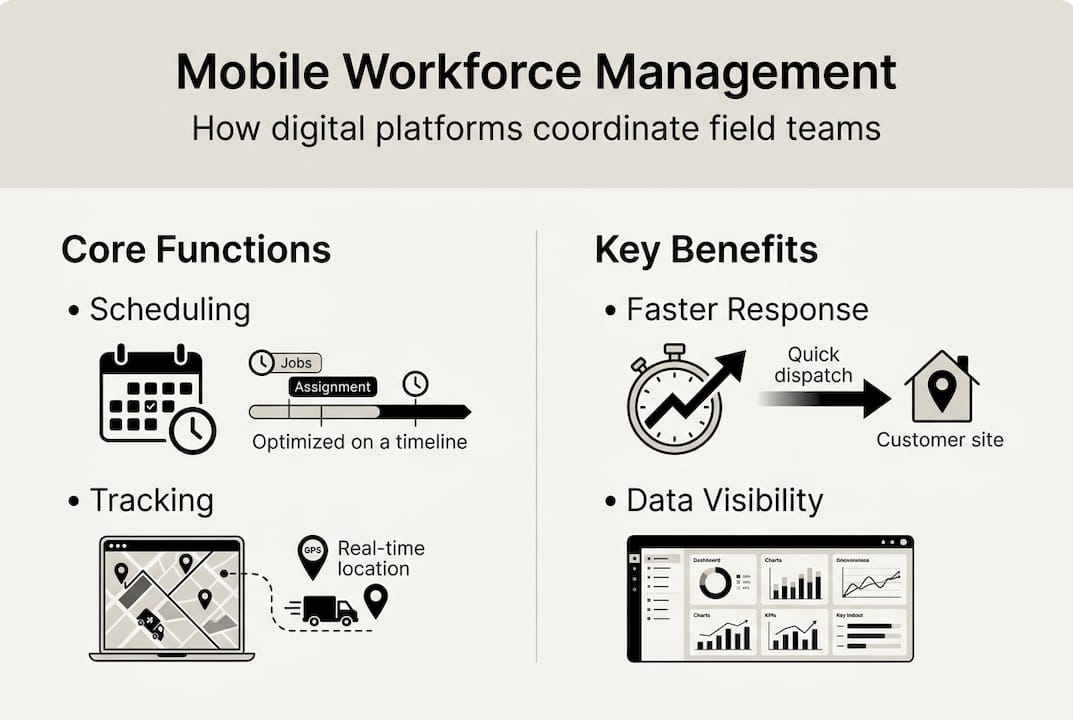
Mobile workforce management encompasses the systematic coordination of field service activities through digital platforms that connect office administrators with mobile technicians. This approach replaces fragmented communication methods with integrated systems that handle scheduling, dispatch, real-time tracking, and reporting from a single interface. Rather than relying on phone calls, spreadsheets, and manual updates, organisations gain instant visibility into who is working where, which assets need attention, and how resources are being utilised throughout the day.
The core components work together to create a seamless operational flow. Scheduling modules assign jobs based on technician availability, skills, and location whilst considering asset priorities and service level agreements. Dispatch functions send work orders directly to mobile devices with all necessary information including asset history, required parts, and site access details. Real-time tracking shows technician locations and job progress, allowing administrators to respond quickly when priorities shift or emergencies arise. Reporting capabilities capture time spent, materials used, and work completed, creating an audit trail that supports billing, compliance, and performance analysis.
This matters because traditional coordination methods create hidden inefficiencies that compound over time. Technicians waste hours driving between poorly sequenced jobs. Administrators struggle to answer customer enquiries about job status. Asset maintenance gets delayed because nobody has clear visibility into what needs attention. Mobile workforce management systems eliminate these friction points by automating routine coordination tasks and providing the information everyone needs exactly when they need it.
Technology advancements have made these capabilities accessible to organisations of all sizes. Mobile applications give technicians powerful tools in their pockets, from digital checklists to photo documentation. Cloud-based dashboards provide administrators with real-time oversight without requiring complex server infrastructure. Integration capabilities connect workforce management platforms with existing enterprise resource planning and asset management systems, ensuring data flows smoothly across the organisation.
Pro Tip: Before implementing any technology, map your current workflows in detail to identify specific pain points and bottlenecks. This baseline understanding helps you configure systems to address real problems rather than simply digitising existing inefficiencies.
How mobile workforce management enhances field service efficiency
Efficient scheduling forms the foundation of improved field service operations. When systems automatically optimise technician routes based on job locations, traffic patterns, and time windows, organisations cut downtime by up to 30% through better resource allocation. Technicians complete more jobs per day without working longer hours. Travel costs decrease as vehicles cover fewer unnecessary kilometres. Customer satisfaction improves because arrival times become predictable and reliable.
Mobile workforce management software can cut downtime by up to 30% through better scheduling and resource allocation.
Real-time communication transforms how field teams handle unexpected situations. When a technician discovers an asset needs additional parts or specialist expertise, they can instantly request support through the mobile application. Administrators see the request immediately and can reassign resources, order materials, or adjust subsequent appointments to accommodate the change. This responsiveness prevents small issues from cascading into major delays that affect multiple customers and assets throughout the day.
Centralised data management gives maintenance administrators unprecedented visibility into asset servicing needs. Rather than relying on technicians to remember and report maintenance requirements, systems automatically track service history, identify patterns, and flag assets approaching scheduled maintenance intervals. Administrators can prioritise work based on asset criticality, failure risk, and resource availability. This proactive approach catches problems before they cause breakdowns, extending asset lifespan and reducing emergency repair costs.

Better resource allocation directly impacts operational costs and asset reliability. When systems match technician skills to job requirements automatically, first-time fix rates improve because the right person handles each task. Work orders management platforms with real-time dashboards enable quicker decision-making by showing which technicians have capacity for urgent requests and which jobs can be rescheduled without service level violations. This flexibility helps organisations maintain high service standards even during peak demand periods or when unexpected absences reduce available staff.
Key efficiency gains from mobile workforce management include:
- Reduced administrative burden through automated scheduling and dispatch
- Improved technician productivity via optimised routing and digital work orders
- Faster response times enabled by real-time visibility and communication
- Enhanced asset reliability through proactive maintenance tracking
- Lower operational costs from reduced travel and improved first-time fix rates
The cumulative effect of these improvements transforms field service from a reactive, crisis-driven operation into a predictable, efficient process. Organisations gain the control needed to plan strategically rather than constantly firefighting immediate problems. This shift enables field service management optimisation that delivers measurable improvements in both operational metrics and customer satisfaction scores.
Technology components and integration considerations
Mobile workforce management platforms comprise several interconnected technology components that work together to coordinate field operations. Mobile applications provide technicians with digital work orders, asset information, and communication tools whilst capturing job completion data, photos, and customer signatures. GPS tracking shows real-time technician locations and enables accurate mileage recording for billing and compliance purposes. Scheduling software optimises job assignments based on multiple factors including skills, location, availability, and priorities. Real-time dashboards give administrators instant visibility into all field activities with the ability to drill down into specific jobs, technicians, or assets.
| Technology Feature | Bénéfice principal | Considérations relatives à la mise en œuvre |
|---|---|---|
| Mobile applications | Provides technicians with digital tools and real-time information | Requires devices that work reliably in field conditions |
| GPS tracking | Enables route optimisation and accurate location data | Must address privacy concerns and battery consumption |
| Scheduling automation | Reduces manual coordination and improves efficiency | Needs accurate data about job durations and technician capabilities |
| Real-time dashboards | Gives administrators instant operational visibility | Requires reliable mobile data connectivity |
| Integration APIs | Connects workforce management with enterprise systems | Demands careful data mapping and testing |
Integration with existing enterprise systems presents both opportunities and challenges. Connecting workforce management with ERP systems drives operational efficiencies by synchronising customer data, inventory levels, and financial information across platforms. When a technician completes a job, the system can automatically update asset maintenance records, trigger parts reordering, and generate invoices without manual data entry. This integration eliminates duplicate work and reduces errors caused by manual transcription.
However, integration complexity varies significantly based on system architectures and data structures. Legacy systems may lack modern APIs, requiring custom development or middleware solutions. Data formats often differ between platforms, necessitating careful mapping to ensure information translates correctly. Real-time synchronisation demands reliable network connectivity and robust error handling to prevent data loss when connections fail.
Successful integration starts with clear objectives about which data needs to flow between systems and how frequently updates must occur. Some information requires real-time synchronisation whilst other data can update in batches overnight. Understanding these requirements helps organisations choose appropriate integration approaches that balance functionality with implementation complexity and ongoing maintenance costs.
Modern integrations in asset management extend beyond basic data exchange to enable advanced capabilities like predictive maintenance alerts and automated scheduling based on asset condition monitoring. Sensors can detect equipment anomalies and automatically create work orders assigned to qualified technicians, closing the loop between asset monitoring and maintenance execution.
Pro Tip: Prioritise integration with systems that hold critical operational data first, such as asset registers and customer databases. Prove value with these core connections before expanding to more complex integrations with secondary systems.
Implementing mobile workforce management for optimal asset maintenance
Applying mobile workforce management to maintenance operations requires a structured approach that addresses technology, processes, and people. Follow these steps to ensure successful implementation:
- Evaluate current maintenance workflows to identify specific inefficiencies and pain points that mobile workforce management should address
- Define clear objectives with measurable targets for improvements in areas like response time, first-time fix rate, and asset uptime
- Select software that matches your operational requirements, integration needs, and budget whilst supporting future growth
- Configure scheduling rules, asset hierarchies, and workflow automation based on your documented processes
- Train staff thoroughly on both system functionality and new work practices, ensuring everyone understands how their role changes
- Launch with a pilot group to validate configuration and identify issues before full deployment
- Monitor performance metrics closely and gather user feedback to guide continuous improvement
- Expand capabilities gradually as users become comfortable with core functionality
Maintenance operations gain specific benefits from mobile workforce management that directly impact asset reliability and operational costs. Digital work orders ensure technicians have complete asset history and maintenance procedures at their fingertips, improving work quality and consistency. Photo documentation creates visual records of asset condition over time, helping identify degradation patterns before failures occur. Automated scheduling ensures preventive maintenance tasks happen on schedule rather than getting postponed during busy periods.
Key maintenance benefits include:
- Improved compliance with scheduled maintenance through automated reminders and tracking
- Better asset history documentation enabling trend analysis and predictive maintenance
- Faster emergency response by quickly identifying and dispatching the nearest qualified technician
- Enhanced spare parts management through integration with inventory systems
- Reduced paperwork and administrative burden for maintenance coordinators
Using data insights transforms maintenance from reactive repairs to proactive asset management. Systems track metrics like mean time between failures, maintenance costs per asset, and technician productivity. Administrators can identify which assets consume disproportionate maintenance resources and make informed decisions about repair versus replacement. Creating effective maintenance schedules becomes data-driven rather than based solely on manufacturer recommendations or gut feeling.
Mobile workforce management directly supports preventive maintenance by ensuring tasks occur consistently and completely. Checklists guide technicians through required inspection points, reducing the risk of missed items. Systems can enforce quality gates that prevent job closure until all required data and photos are captured. This discipline improves maintenance effectiveness whilst building the historical data needed for more sophisticated asset management strategies.
Resource allocation optimisation becomes possible when systems provide visibility into technician skills, certifications, and workload. Administrators can balance routine maintenance across the team whilst ensuring complex repairs go to specialists. This matching improves both efficiency and quality whilst supporting staff development by gradually expanding less experienced technicians’ responsibilities under appropriate supervision.
Pro Tip: Review scheduling and performance metrics monthly during the first six months after implementation. Use this data to refine automation rules, adjust time estimates, and identify training needs. Regular optimisation maximises return on your technology investment.
Explore FullyOps solutions to boost your mobile workforce management
FullyOps provides comprehensive platforms designed specifically for operations managers seeking to modernise their mobile workforce coordination and asset maintenance processes. Our resource allocation tools help you optimise technician assignments based on skills, location, and workload whilst our gestion du cycle de vie des actifs capabilities track maintenance history and predict service needs. The platform’s work orders management system delivers real-time dashboards that give you instant visibility into all field activities, enabling faster decision-making and improved coordination. Explore our tutorials and feature overviews to discover how FullyOps can transform your mobile workforce efficiency and asset reliability.
Questions fréquemment posées
What exactly does mobile workforce management involve?
Mobile workforce management coordinates field personnel through integrated technology platforms handling scheduling, dispatch, real-time tracking, and communication. It replaces fragmented manual processes with automated systems that optimise routes, match skills to jobs, and provide instant visibility into all field activities.
How does mobile workforce management improve operational efficiency?
Systems reduce technician travel time through optimised routing, enable faster response to urgent requests via real-time communication, and improve first-time fix rates by matching qualified technicians to appropriate jobs. These improvements typically reduce downtime by 20-30% whilst lowering operational costs.
What technology components are essential for mobile workforce management?
Core components include mobile applications for technicians, GPS tracking for location visibility, scheduling software for job optimisation, and real-time dashboards for administrator oversight. Integration capabilities connecting these tools with existing enterprise systems are equally critical for seamless data flow.
What challenges should organisations expect when implementing mobile workforce management?
Common challenges include integrating new systems with legacy platforms, managing change amongst staff accustomed to traditional processes, ensuring reliable mobile connectivity in all service areas, and configuring automation rules that match actual operational requirements. Thorough planning and phased implementation help address these issues.
How does mobile workforce management support asset maintenance?
Systems ensure preventive maintenance occurs on schedule through automated reminders, provide technicians with complete asset history during service calls, capture detailed documentation including photos for trend analysis, and enable data-driven decisions about asset repair versus replacement based on maintenance cost tracking.
Can small organisations benefit from mobile workforce management?
Yes, cloud-based platforms make sophisticated workforce management accessible to organisations of all sizes without requiring extensive IT infrastructure. Even small teams gain significant efficiency improvements from optimised scheduling, digital work orders, and centralised communication that eliminates coordination friction.
Recommandé
- Harness mobile apps to enhance field service efficiency
- Why Mobile Field Service Transforms HVAC & Plumbing
- La gestion des services de terrain expliquée : Impact de la transformation numérique
- Guide de planification des services sur le terrain pour un déploiement efficace des techniciens