

TL;DR:
- Webhooks deliver event data instantly to your system, but their failure often originates from misconfiguration or unreachable endpoints. Proper troubleshooting involves checking delivery logs, validating endpoint accessibility, and verifying signature security measures to ensure reliable event processing. Fullyops enhances webhook stability by integrating logging, replay support, idempotency, and automated failure handling into maintenance workflows.
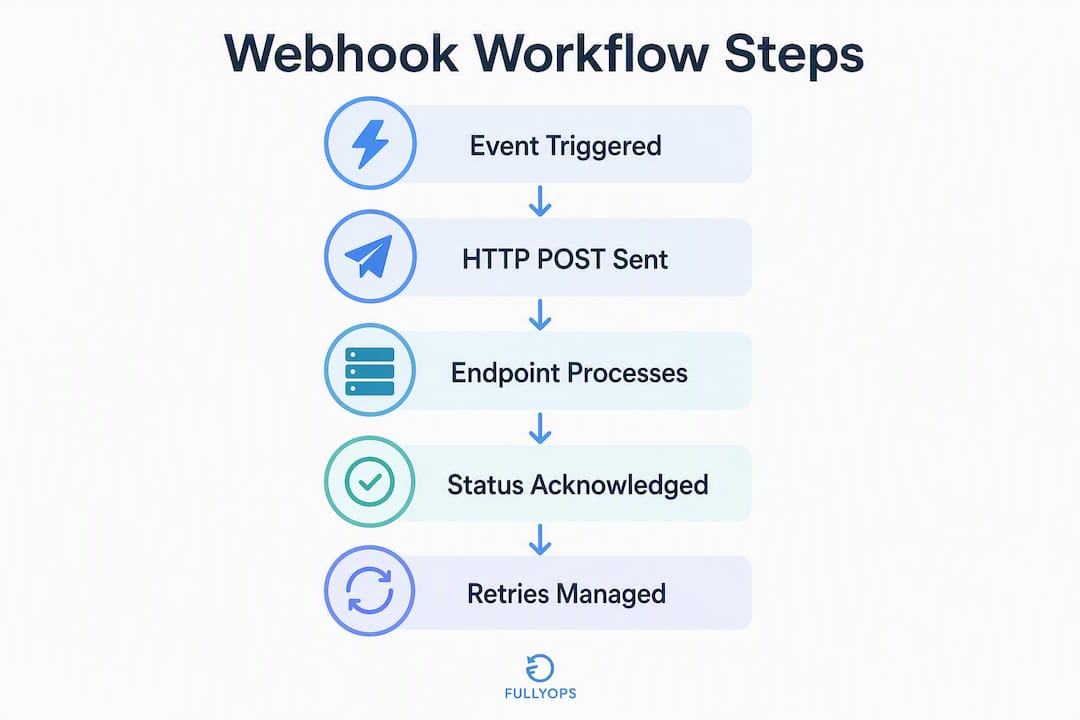
Webhooks push event data, such as a work order.completed notification, directly to your system the moment something happens. When they fail, the fix almost always starts in the same three places: check the provider’s delivery log, confirm your endpoint is publicly reachable over HTTPS, and capture the raw incoming request before your application touches it. Acknowledge every webhook promptly and hand processing to a background worker — providers typically retry multiple times before giving up.
First three actions when a webhook stops working:
- Check the provider dashboard for delivery status and HTTP response codes
- Confirm your endpoint URL is publicly accessible and has a valid TLS certificate
- Use a webhook bin or inspector to capture the raw request, headers, and body
Statistic callout: Acknowledge webhook requests in under 5 seconds; practitioners set retry thresholds at 5–7 attempts before routing events to a dead-letter queue.
Table of Contents
- How do webhooks fit into a CMMS or FSM workflow?
- How do you configure a reliable webhook endpoint?
- How do you secure and verify webhook events?
- What causes webhook failures, and how do you troubleshoot them?
- How should you configure retries, backoff, and dead-letter queues?
- How do you make webhook handlers idempotent?
- How do you test webhooks and monitor them in production?
- Sample payloads and HTTP responses for maintenance events
- How Fullyops handles webhook integrations in maintenance workflows
- Key takeaways
- The part most teams get wrong
- Fullyops makes webhook reliability part of the platform
- Useful sources
- FAQ
How do webhooks fit into a CMMS or FSM workflow?
A webhook is an event-driven push mechanism: the source system sends an HTTP POST to your endpoint the instant a defined event occurs, rather than waiting for your system to ask. Compared with polling, where your application repeatedly queries an API on a schedule, webhooks reduce both CPU load and network overhead for event notifications.
In a maintenance or field service context, three use cases stand out.
Work order status changes. When a technician marks a job complete in one platform, a work order.completed event fires immediately. A receiving CMMS can update asset history, close the linked ticket, and trigger a customer notification without any scheduled polling job running in between.
Asset telemetry alerts. Condition-monitoring sensors or IoT gateways can push threshold-breach events, such as a motor temperature exceeding a set limit, directly to your FSM. The work order management dashboard can then auto-create a corrective work order before a technician even notices the alert.
Inventory low-stock notifications. When a parts management system detects that a critical spare has dropped below its reorder point, a webhook can trigger a purchase requisition or flag the shortage against an open work order.
That said, webhooks carry real limitations. Delivery semantics are “at least once,” meaning your handler may receive the same event more than once. Events can also arrive out of order, particularly during retry storms. Crucially, the event payload is a snapshot, not the authoritative current state. Webhooks and APIs are complementary: use the webhook for the notification, then call the API to fetch the full, current object when you need guaranteed accuracy.
How do you configure a reliable webhook endpoint?
Getting the receiving endpoint right prevents the majority of delivery failures. Work through this checklist before connecting any provider.
- Expose a public HTTPS endpoint — The URL must be reachable from the open internet. During development, use a tunnelling tool such as ngrok or a webhook relay service; in production, use a stable hostname rather than an IP address.
Pro Tip: Set up a capture-and-forward inspector that durably stores and replays events. It is one of the highest-leverage pieces of webhook infrastructure you can add, because it lets you replay any event against a new handler version without waiting for the provider to re-fire.
How do you secure and verify webhook events?
Security for webhook endpoints centres on three controls: signature verification, transport security, and replay protection.

Signature verification. Providers sign the request body with a shared secret using HMAC-SHA256 or a similar algorithm. Always verify against the original raw byte stream, not a re-serialised version of the parsed JSON. Parsing and re-serialising the body changes whitespace and key ordering, which invalidates the signature. Use a timing-safe comparison function (such as hmac.compare_digest in Python or crypto.timingSafeEqual in Node.js) to prevent timing attacks.
TLS everywhere. Only accept connections over HTTPS. Rotate your TLS certificates before expiry and prefer per-endpoint signing secrets where the provider supports them, so a compromised secret on one endpoint does not affect others.
IP allow-listing. When your provider publishes a fixed range of source IP addresses, configure your load balancer or firewall to accept webhook traffic only from those ranges. This is a defence-in-depth measure, not a replacement for signature verification.
Replay protection. Some providers include a timestamp and a nonce in the signature payload. Validate that the timestamp is within an acceptable window (typically five minutes) and reject requests outside it. Log verification outcomes, including failures, for audit and incident response purposes.
Pro Tip: Log every signature verification result, pass or fail, with the provider event ID and timestamp. When an incident occurs, that log is the fastest way to determine whether the problem was a secret mismatch, a replay attack, or a code regression.
What causes webhook failures, and how do you troubleshoot them?
Start with two questions: did the provider send the request? Did it reach your handler? The answers point you to completely different fixes.
Two-question triage:
- Provider did not send: Check the subscription status in the provider dashboard. A scheduled maintenance window, a configuration change, or an expired credential can silently deactivate a subscription. After any maintenance change, verify subscription status and firewall rules first before assuming a code regression.
- Provider sent but handler did not receive: Use a webhook bin to confirm the request left the provider, then check DNS resolution, firewall rules, and load balancer configuration for your endpoint. Provider IP ranges blocked at the edge are a common silent failure.
Common causes checklist:
- Subscription disabled or event type not selected
- Wrong or deprecated endpoint URL
- DNS resolution failure for the endpoint hostname
- Firewall or load balancer blocking provider IP ranges
- Expired TLS certificate
- Signature mismatch (often caused by verifying against re-serialised body — see the security section above)
Content-Typemismatch causing the framework to reject or misparse the body- Slow synchronous handler causing the provider to time out and retry
HTTP status codes and provider behaviour:
| Status code | Provider action |
|---|---|
| 2xx | Delivery confirmed; no retry |
| 4xx | Permanent failure; provider may stop retrying |
| Too Many Requests | Provider backs off and retries |
| 5xx | Transient failure; provider retries with backoff |
| Timeout / no response | Treated as 5xx; provider retries |
To debug effectively, capture the exact incoming request using a webhook bin or inspector before your application processes it. Examine the raw headers, the Content-Type, the signature header value, and the body. Most failures become obvious once you separate provider delivery problems from application parsing or handler logic.
How should you configure retries, backoff, and dead-letter queues?
Exponential backoff means each successive retry waits longer than the last, reducing pressure on a struggling endpoint and giving it time to recover. A practical schedule for a maintenance integration looks like this: retry at 1 minute, then 5 minutes, then 30 minutes, then escalate to a dead-letter queue (DLQ) after 5–7 attempts. This threshold range reflects standard practitioner guidance.
The DLQ is not a bin for lost events — it is an operational tool. Implement a small DLQ admin page that records the error, timestamp, and raw event payload, and allows manual re-queuing once the underlying problem is resolved. Alert on DLQ inserts so the team knows within minutes when events start failing, rather than discovering the gap hours later when a work order is missing from the system.
One subtlety worth noting: if your own background worker also retries on failure, you have two retry loops running. Both sides retrying independently multiplies the risk of duplicate processing. That is why idempotency, covered in the next section, is not optional when retries are in play.
How do you make webhook handlers idempotent?
Idempotency means processing the same event twice produces exactly the same outcome as processing it once. Given that webhook delivery is “at least once,” every handler must be idempotent by design.
The standard pattern:
- Persist a processed-event record keyed by
(provider, event_id)in a database table before executing any business logic. - Use an atomic insert or upsert. If the record already exists, skip processing and return success immediately. This prevents duplicate work orders, duplicate inventory adjustments, or duplicate notifications.
- Wrap multi-step operations in a database transaction. Insert the idempotency record and execute the business logic atomically so a crash mid-operation does not leave a half-processed state.
- Validate timestamps and ordering. If an older event arrives after a newer one, check the event timestamp before applying state changes. For digital work order workflows, applying a “reopened” event after a “completed” event would corrupt asset history.
- Refetch from the API when state matters. For critical decisions, do not rely solely on the event payload. Call the provider API to retrieve the current object state before acting.
Pro Tip: Implement idempotency from day one. Retrofitting it after duplicate records have accumulated in a CMMS is far more expensive than building the idempotency table into the initial schema.
How do you test webhooks and monitor them in production?
Testing and monitoring are separate activities. Testing validates behaviour before release; monitoring catches regressions in live traffic.
Testing workflow. Point a webhook bin at your endpoint and trigger a real event from the provider. Capture the raw request, including all headers and the exact body bytes. Replay that captured request against your local handler to confirm parsing, signature verification, and business logic all behave correctly. Then write unit tests using signed sample payloads so regressions surface in CI before deployment.
A quick diagnostic with curl can confirm your endpoint is reachable and returns the expected status:
curl -X POST https://your-endpoint.example.com/webhooks
  -H "Content-Type: application/json"
  -H "X-Webhook-Signature: test_value"
  -d '{"event":"work_order.completed","id":"evt_001"}'
Check the response status code, the response headers, and the server logs to confirm the raw body was captured before any parsing occurred.
Production monitoring. Track four metrics: delivery success rate, queue depth, error rate, and time-to-acknowledge. Alert when the DLQ receives any insert, when the error rate exceeds a threshold you define based on your volume, or when time-to-acknowledge climbs above 5 seconds. Webhook monitoring in production means capturing real events, tracking schema changes over time, and alerting when integrations break — not just running tests in development.
Sample payloads and HTTP responses for maintenance events
A work_order.completed event payload typically contains the fields your CMMS needs to close the job and update asset history:
{
  "event": "work_order.completed",
  "id": "evt_a1b2c3d4",
  "work_order_id": "wo_9988",
  "asset_id": "asset_4421",
  "technician_id": "tech_007",
  "timestamp": "2026-03-14T09:45:00Z",
  "summary": "Replaced drive belt; asset returned to service."
}
Headers commonly present in provider requests:
Content-Type: application/jsonX-Webhook-Signature: sha256=<hmac_value>(name varies by provider)X-Provider-Event-Id: evt_a1b2c3d4(use this as your idempotency key)X-Webhook-Timestamp: 1710409500
Recommended HTTP responses:
- 200 OK or 202 Accepted: Event received and queued. Return this within 5 seconds regardless of processing outcome.
- 400 Bad Request: Malformed payload or missing required fields. The provider will typically not retry a 4xx.
- 401 Unauthorised: Signature verification failed. Log the failure with the event ID for audit purposes.
- 500 Internal Server Error: Transient server fault. The provider will retry with exponential backoff, so only return 5xx when you genuinely want a retry.
How Fullyops handles webhook integrations in maintenance workflows
Fullyops is built for teams that need reliable, auditable event flows between their operational tools and their CMMS. The platform’s integration layer is designed around the patterns this guide describes.
Platform capabilities relevant to webhook integrations:
- Stable, versioned integration endpoints that map cleanly to Fullyops work order and asset states
- Event logging with replay support, so teams can re-process a missed event without waiting for the provider to re-fire
- Idempotency handling at the ingestion layer, preventing duplicate work orders from repeated deliveries
- Inventory module integration, so a low-stock webhook event can automatically flag a shortage against an open work order
- Role-based visibility, meaning technicians, administrators, and managers each see the event data relevant to their function
When mapping provider event types to Fullyops work order states, include work_order_id, asset_id, technician_id, and timestamp in every payload. These four fields give the platform enough context to route the event correctly without an additional API call in most cases. For field service scheduling triggered by webhook events, include the site location and priority level as well.
For teams evaluating how integrations drive efficiency in asset management, Fullyops provides implementation guidance and a product demo on request.
Key takeaways
Reliable webhook integrations in maintenance systems depend on four non-negotiable practices: acknowledge fast, persist the raw event, enforce idempotency, and instrument a dead-letter queue with alerts.
| Point | Details |
|---|---|
| Acknowledge within 5 seconds | Return 2xx immediately and hand all processing to a background worker to prevent provider retries. |
| Persist the raw event first | Write raw bytes and the provider event ID to durable storage before any parsing or business logic runs. |
| Enforce idempotency by event ID | Key a processed-events table on (provider, event_id) and skip duplicates with an atomic upsert. |
| Route failures to a DLQ | After 5–7 retry attempts, move events to a dead-letter queue and alert the team on every insert. |
| Fullyops integration layer | Fullyops provides event logging, replay support, and idempotency handling for CMMS webhook workflows. |
The part most teams get wrong
The most common mistake in maintenance webhook integrations is not a missing security header or a misconfigured firewall. It is the assumption that the system can be retrofitted for reliability after go-live.
Teams typically build the happy path first: the provider fires an event, the handler processes it, the work order updates. That works fine in testing. In production, a brief network interruption causes the provider to retry. The handler processes the event twice. Now there are two work orders for the same job, or an inventory adjustment has been applied twice, and untangling that in a live CMMS is genuinely painful.
The same logic applies to dead-letter queues. Teams often treat the DLQ as a future concern, something to add once the integration is stable. But the DLQ is precisely what makes the integration stable. Without it, failed events disappear silently, and the first sign of a problem is a maintenance manager asking why a work order was never created.
Design for retries and idempotency before the first event reaches production. The cost of building it in from the start is low. The cost of cleaning up duplicated records in a production CMMS, while the maintenance team is trying to use the system, is not.
Fullyops makes webhook reliability part of the platform
For maintenance teams managing multiple integrations across CMMS, ERP, and IoT systems, the overhead of building and maintaining custom webhook infrastructure adds up quickly. Fullyops removes that overhead by providing a platform where event logging, retry handling, idempotency, and replay are built into the integration layer rather than left to each team to implement separately.
The practical result: when a provider retries an event, Fullyops handles the deduplication. When an event fails, the team sees it in the event log rather than discovering the gap from a missing work order. For teams ready to see how that works in their environment, explore Fullyops maintenance software or request a product demo directly from the platform.
Useful sources
- Hookdeck: Troubleshooting and Debugging Webhooks — systematic approach to diagnosing missing events, duplicates, timeouts, and verification errors
- How to Debug Webhooks: Practical Troubleshooting Guide — step-by-step guide to capturing and inspecting raw requests
- How to Monitor Webhooks in Production — covers production monitoring, schema change tracking, and alerting
- Sanity: Webhook Best Practices — authoritative guidance on idempotency and handler design
- Marqeta: Signature Verification Guide — detailed reference on HMAC verification against raw byte streams
- Fullyops: How Integrations Drive Efficiency in Asset Management — platform-level integration guidance for maintenance teams
- Fullyops: Work Orders Management with Real-Time Dashboard — reference for mapping webhook events to work order states in Fullyops
FAQ
Why is my webhook not working?
Start by checking the provider dashboard for delivery status and HTTP response codes. The most common causes are a disabled subscription, an incorrect or expired endpoint URL, a firewall blocking the provider’s IP ranges, or a signature verification failure caused by verifying against a re-serialised body rather than the raw byte stream.
What does a webhook actually do?
A webhook sends an HTTP POST to your endpoint automatically when a specific event occurs in the source system, pushing data in real time without your application needing to poll for updates. In a CMMS or FSM context, this means events such as work_order.completed or a low-stock alert reach your system within seconds of occurring.
How can I tell if a webhook is being delivered?
Check the provider’s delivery log or dashboard for the event in question, then use a webhook bin or inspector tool to confirm the request reached your endpoint with the correct headers and body. If the provider shows a successful send but your handler shows nothing, the issue is between the provider and your endpoint, typically DNS, firewall, or TLS.
What is the difference between a webhook and an API?
An API requires your system to request data on demand; a webhook pushes data to your system the moment an event occurs. Use webhooks for real-time notifications and the API to fetch the full, authoritative current state of an object when you need it, since webhook payloads are snapshots and may not reflect subsequent changes.
How does Fullyops handle duplicate webhook deliveries?
Fullyops applies idempotency handling at the integration layer, using the provider event ID to detect and skip duplicate deliveries. This prevents duplicate work orders or inventory adjustments from appearing in the system when a provider retries an event that was already processed successfully.
Recommended
- Boost efficiency with maintenance auditing: a complete guide
- Asset Maintenance Workflow Guide for Optimal Efficiency
- Smart maintenance in 2026: what you need to know